

Software for building managers: bills, payments and a report for residents
Every flat, commercial unit and garage gets a monthly bill with a fixed reference number and an IPS QR code. Payments are split by purpose, such as current and capital maintenance, a monthly report shows residents where the money went, and the annual report goes to the assembly.
- Managers chosen from the owners
- Professional building managers
- Accountants who keep buildings
The demo account lasts 10 days and we set it up together with you. Plan prices are on the Pricing page, and no VAT is added to them.
At a glance
- a month per building with up to 40 flats and commercial units, no VAT added
- 690 RSD
- on every bill, with a fixed reference number for standing orders
- IPS QR
- of reminders: a reminder, a notice and a final notice before legal action
- 3 levels
- monthly report for residents and annual report for the assembly
What a building manager does by hand today, and what the app does
Every month a housing community’s manager makes bills for the flats, tracks who has paid, pays for lift servicing and cleaning, and explains to residents where the money went. Most of it lives in an Excel sheet, a notebook and bank statements. Housing community software keeps all of that work in one place, from the month’s bills to the report for the assembly.
Monthly maintenance bills
Today: The amount for each flat is worked out in Excel, per unit or per m², and every bill or payment slip is filled in by hand.
In the app: You enter the items once: current maintenance, capital maintenance per m² and management. Then one button creates a bill for every flat, commercial unit and garage for the chosen month, with an IPS QR code.
Details: Monthly bills →Who has paid, and who owes
Today: Payments reach the building’s account with all kinds of descriptions, so every month the statement is compared with the list of flats.
In the app: Every flat has a fixed model 97 reference number. After a statement import the “Match payments” button closes that unit’s bills oldest first, and any surplus stays in Bank.
Details: Monthly bills →How much is for the lift, and how much for the façade
Today: All the money sits in the building’s one account, so the reserve fund and current maintenance are tracked in a separate sheet.
In the app: Every bill item goes to its purpose. You allocate statement payments to purposes with the app’s suggestion, and a transfer between purposes carries the assembly decision.
Details: Budget and purposes →A report for residents: where the money went
Today: Residents ask what the money was spent on, and the notice-board report is put together by hand from statements.
In the app: The monthly report comes from statements and bills. It shows the account balance, owners’ payments by purpose, every payment with its recipient and debt by unit label, without names. It goes out as a PDF for the notice board or by email to every owner.
Details: Monthly report →An owner who does not pay
Today: Reminders are typed in Word, default interest is worked out by hand, and bills and proof of delivery are gathered for the lawyer.
In the app: Debtors shows overdue debt with default interest up to today. You send a reminder, a notice and a final notice before legal action, and for enforcement you download one PDF with the bills and delivery records.
Details: Debtors and reminders →The assembly, its decisions and the manager’s annual report
Today: Decisions, votes and the manager’s term sit in minutes, and the annual report is compiled from a whole year of statements.
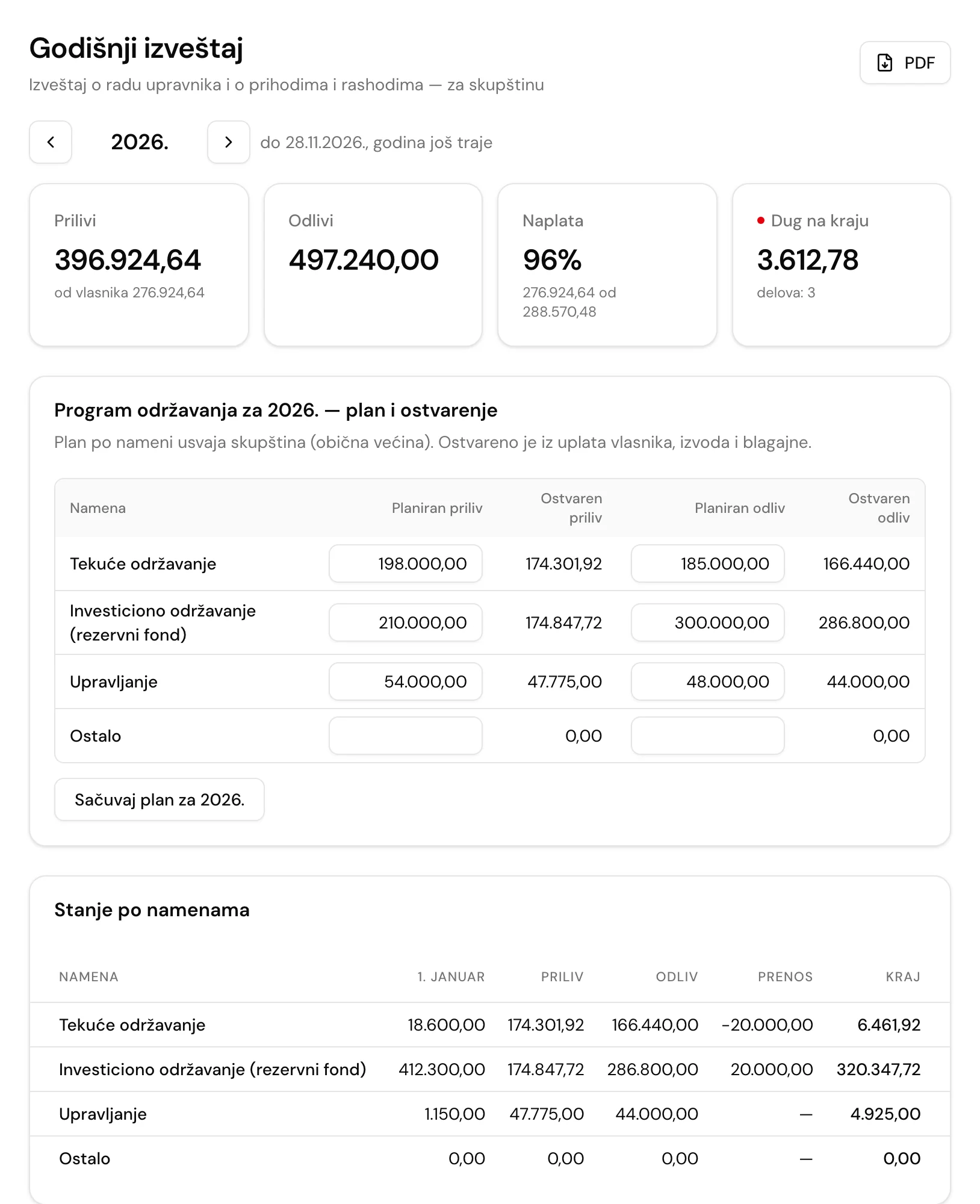
In the app: The app keeps decisions with a check of the required majority, a voting list and a term reminder. It produces the annual report with the maintenance programme, income and spending as a PDF for the assembly.
Details: Assembly and annual report →
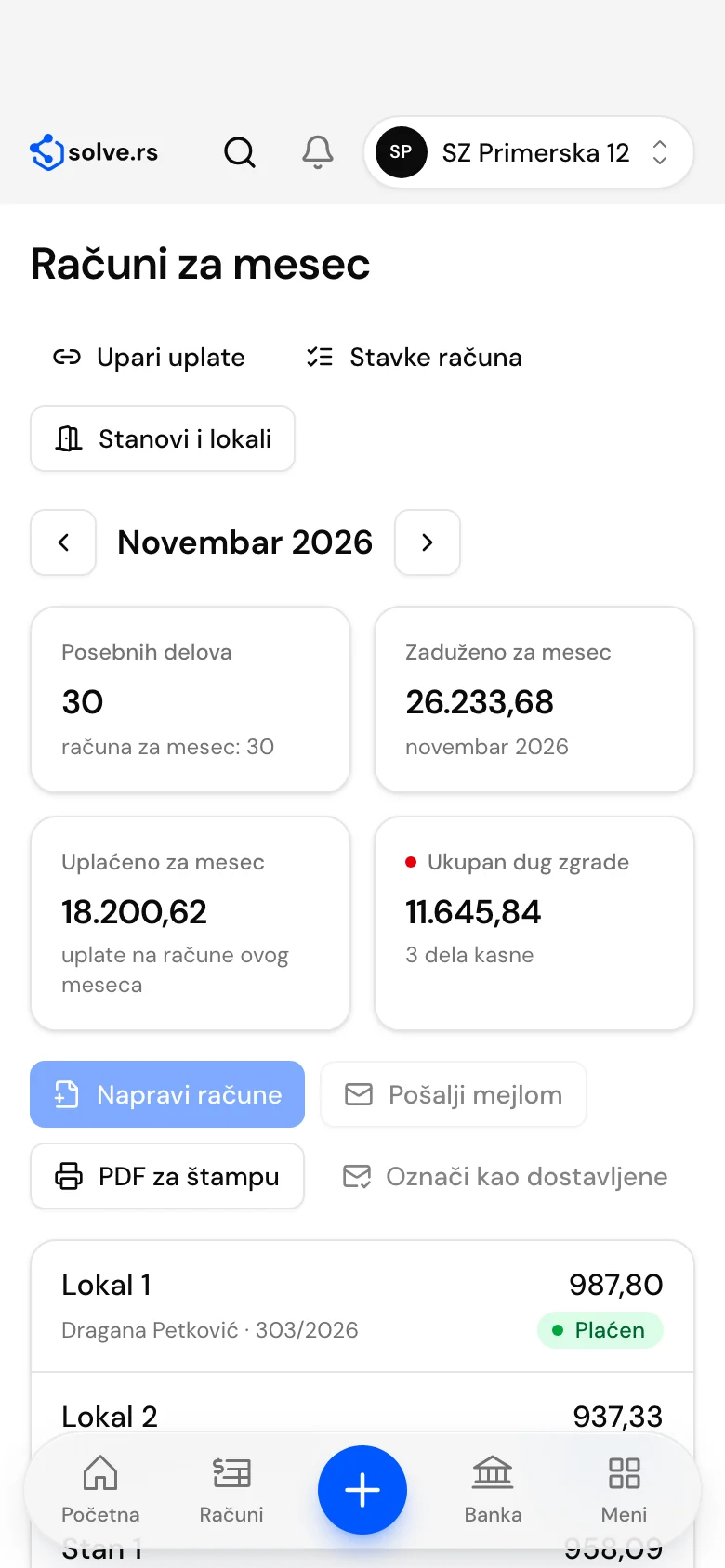
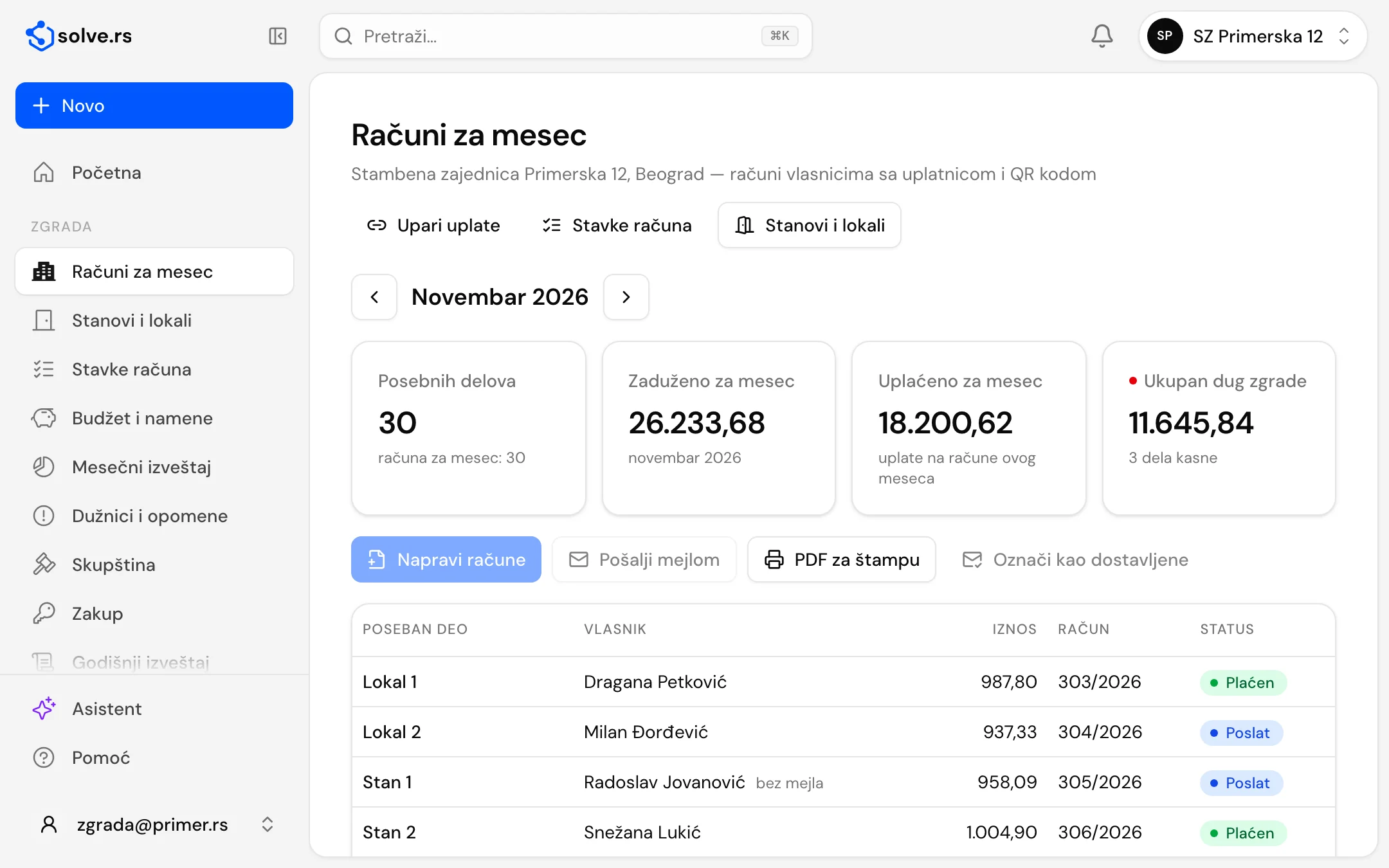
A bill for every flat, every month
The amount comes from the building’s bill items, and the owner gets the bill by email or in the mailbox.
Bills with one button
For the chosen month the app creates a bill for every unit that has an owner. Running it again creates no duplicates, and a wrong bill is reversed and created again.
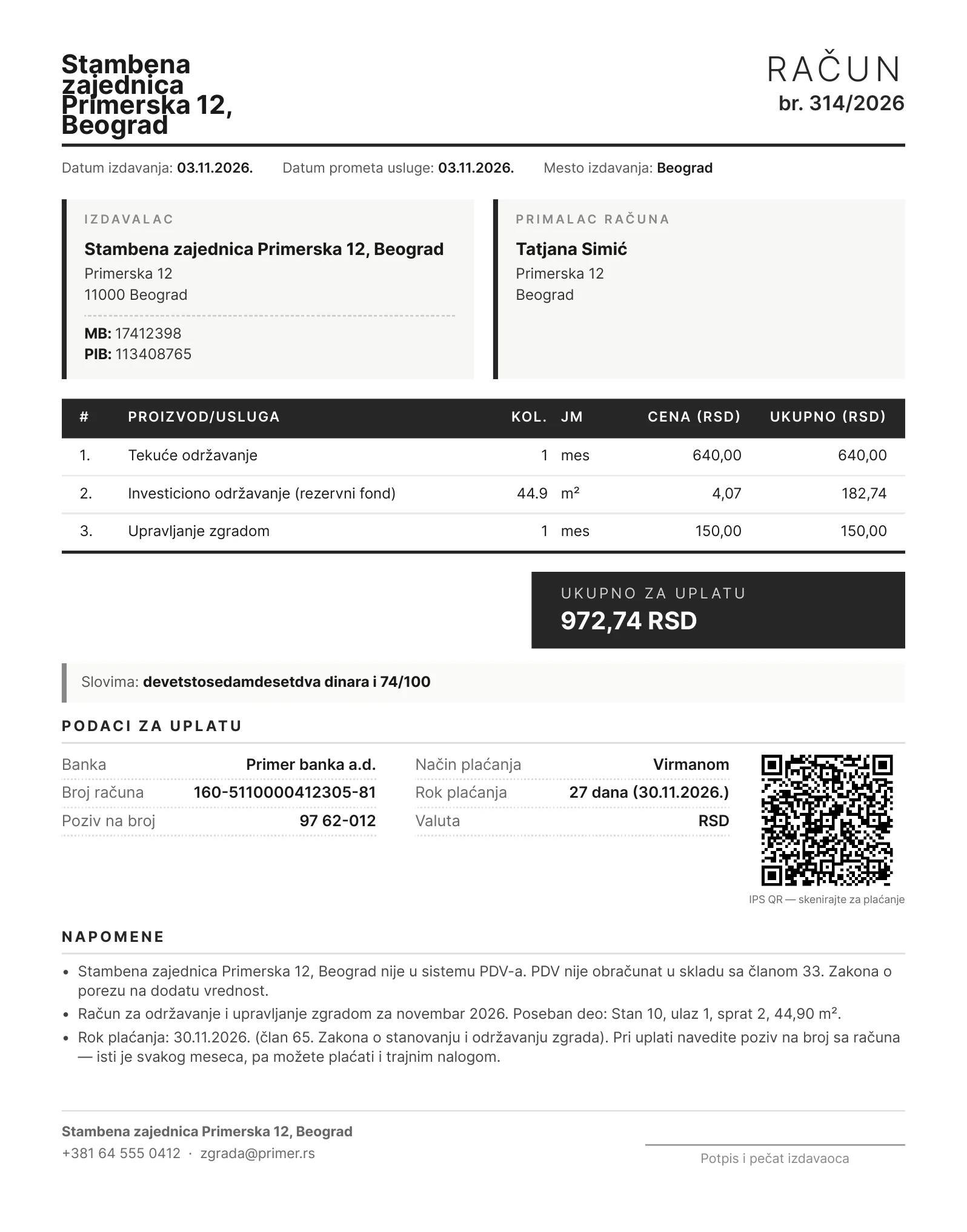
Fixed reference number and IPS QR
Every flat has its own model 97 reference number, the same every month, so the owner can pay by standing order. The bill also carries an IPS QR code for mobile banking.
Due date
The due date is the last day of the month, as Article 65 of the Law on Housing and Building Maintenance requires, or an earlier day of the month set by the owners’ assembly.
By email or in the mailbox
Owners with an email address get the bill as a PDF. For the others you download one PDF to print and mark the bills as delivered to the mailbox, and the delivery date stays recorded on the bill.
Match payments
After a statement import one button links every payment with a unit’s reference number to that unit’s unpaid bills, oldest first. Any surplus stays in Bank.
Month overview
Charged and paid for the month and the building’s total debt, with a switch to earlier months.
Every unit of the building in one list
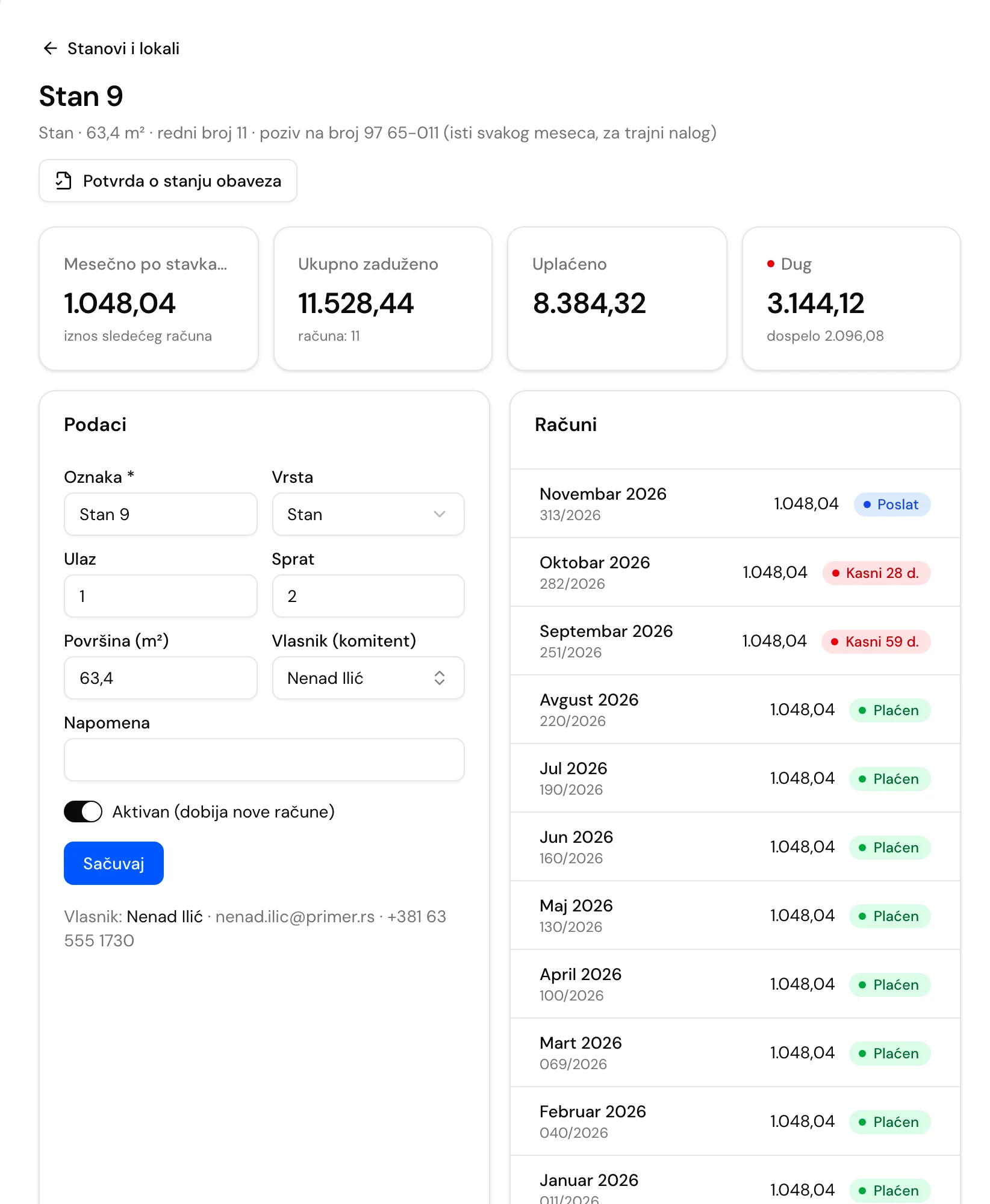
Flats, commercial units, garages and storage rooms with floor area and owner, from Excel or one by one.
Units
A flat, commercial unit, garage, parking space or box and storage room, with entrance, floor and area in m². An owner of a flat and a garage gets a bill for each unit.
Import from Excel
Paste the list from Excel: label, type, entrance, floor, area, owner, email and phone. The app shows any row with an error and the reason.
Owners
An owner is kept with email and phone, and one owner can have several units.
Unit card
The monthly amount by item, total charged, paid and owed, with every bill for that unit.
Statement of obligations
A PDF statement of what a unit owes, for example when a flat is sold.
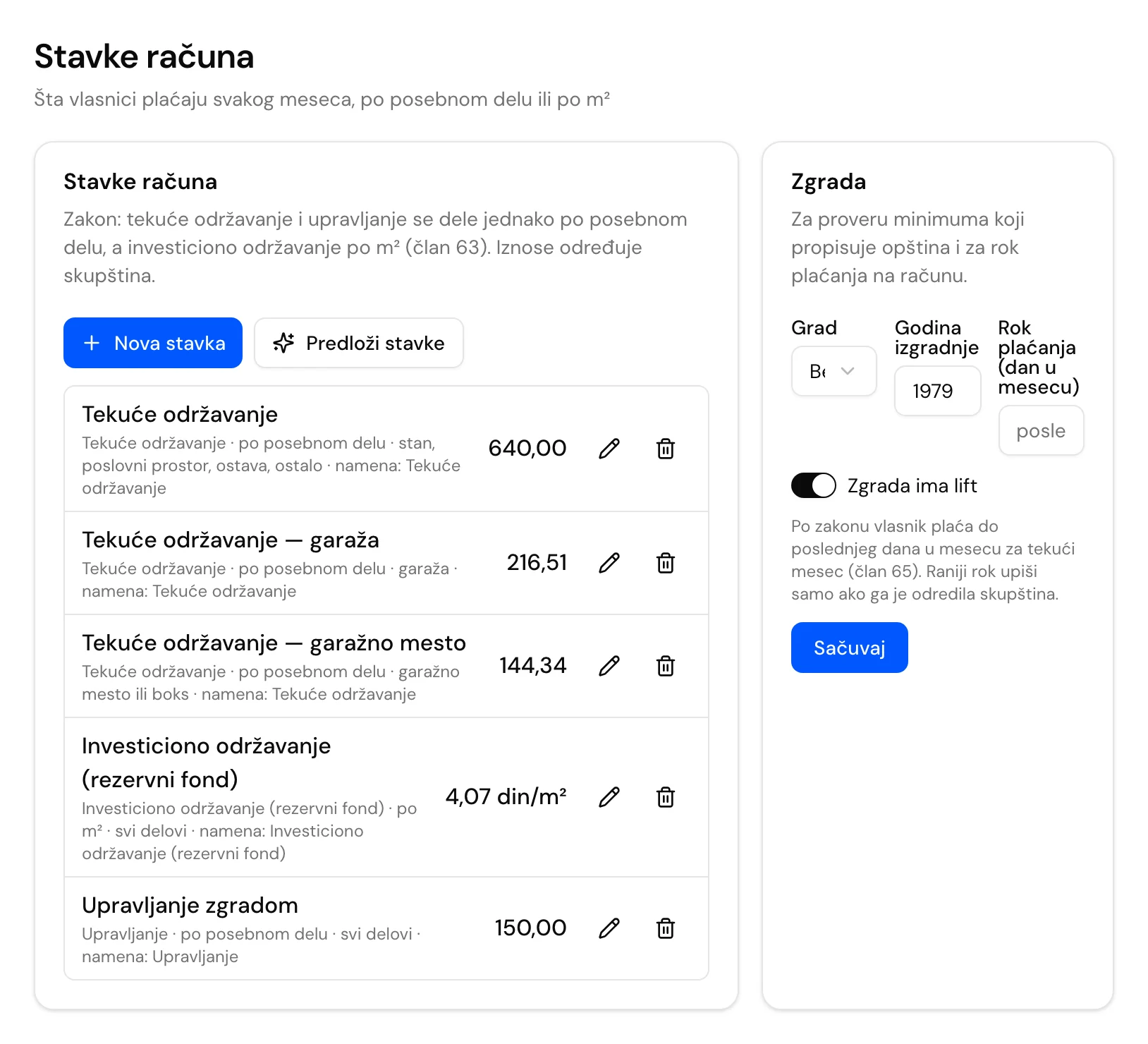
What owners pay, per unit or per m²
Items set the bill amount, and the app compares them with the minimum set by the municipality.
Per unit or per m²
Current maintenance and management equally per unit, capital maintenance by floor area, as Article 63 of the law provides. An item can apply only to some unit types, for example garages.
Municipal minimum
For Belgrade and Novi Sad the app knows the minimum amounts for current and capital maintenance, taking the lift and year of construction into account, and warns when an item is below them.
Suggested items
“Suggest items” adds current maintenance, capital maintenance and management, at the municipal minimum when it is known, plus the basic purposes.
Issued bills stay the same
A new amount applies to bills not yet created, and bills already issued stay as they are.
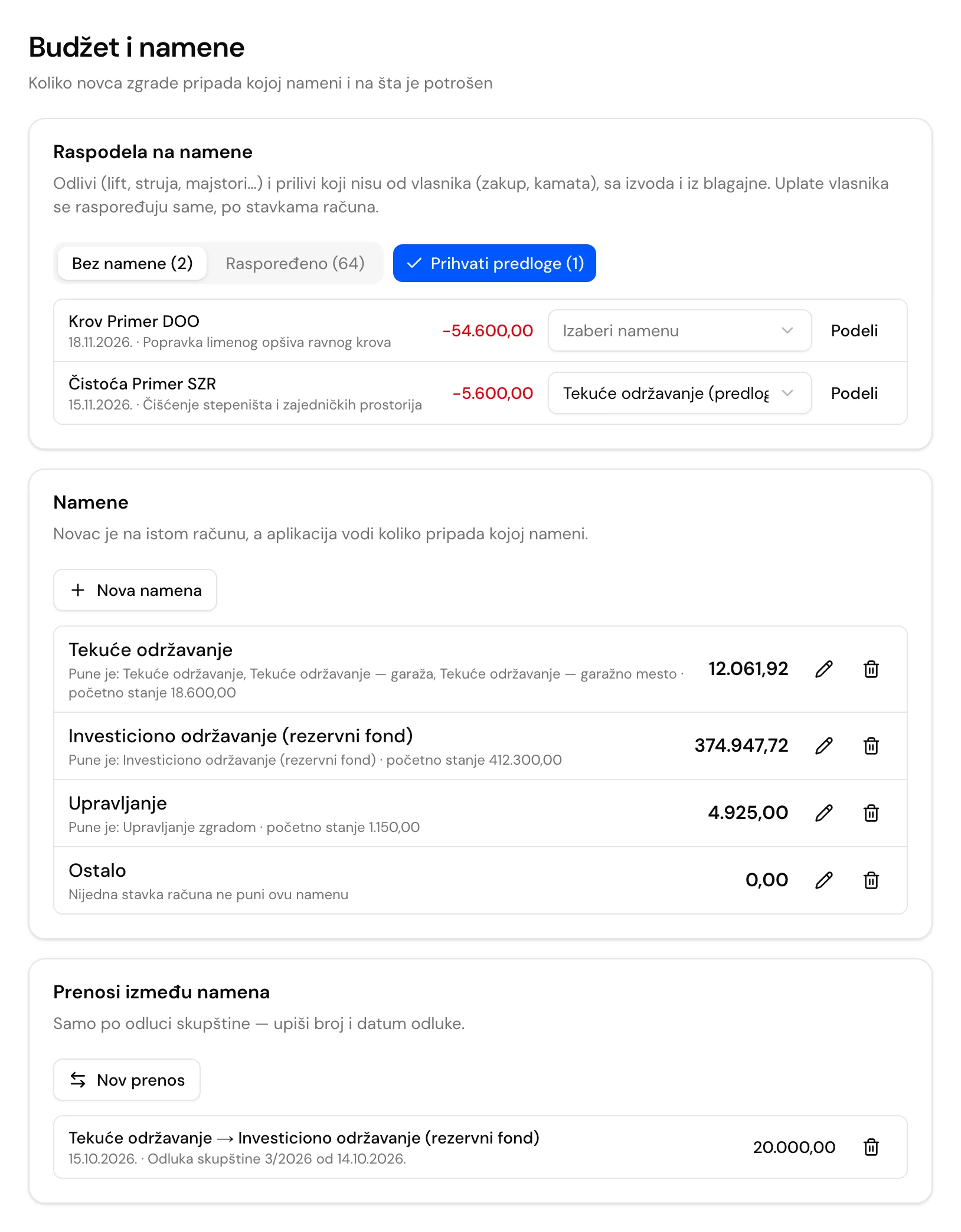
How much money is for the lift, and how much for the façade
The money sits in the building’s one account, and the app tracks how much belongs to each purpose.
Purposes
Current maintenance, capital maintenance (the reserve fund), management and any purposes you add, with an opening balance from earlier years. For an emergency repair a purpose can go below zero.
Payments by purpose
Every bill item goes to its purpose, so an owner’s payment is split across purposes in proportion to the items.
Allocating payments
Allocate payments and inflows from the statement to purposes, and one payment to several purposes. The app suggests a purpose by the same recipient, and you confirm the suggestions all at once.
Transfer between purposes
A transfer carries the number and date of the assembly decision. The building’s total money stays the same, and only the split by purpose changes.
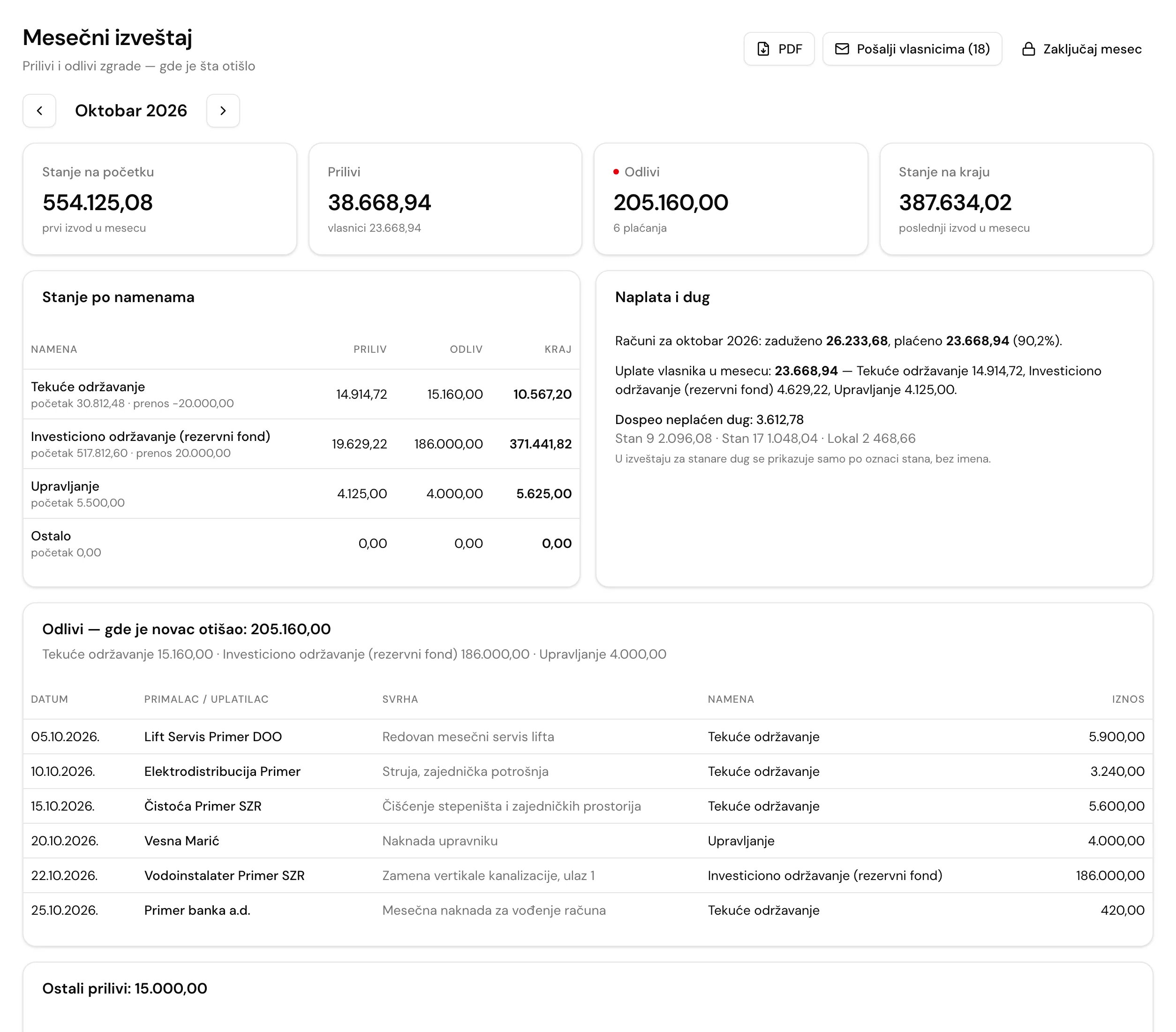
Where the building’s money went
The report comes from the statements and bills you already have, for every month.
Money in and out
The account balance at the start and end of the month from the statements, owners’ payments by purpose, other inflows and every payment with recipient, date, description and purpose.
Balance by purpose
For every purpose the opening, inflow, outflow, transfers and closing balance for the month.
Collection and debt
Charged and paid for the month with the collection rate, and overdue debt by unit label, without owners’ names.
PDF and email to owners
A PDF for the notice board, and with one button the report goes to every owner with an email address.
Locking the month
Once the report is sent you lock the month, and its allocations, transfers and bills no longer change.
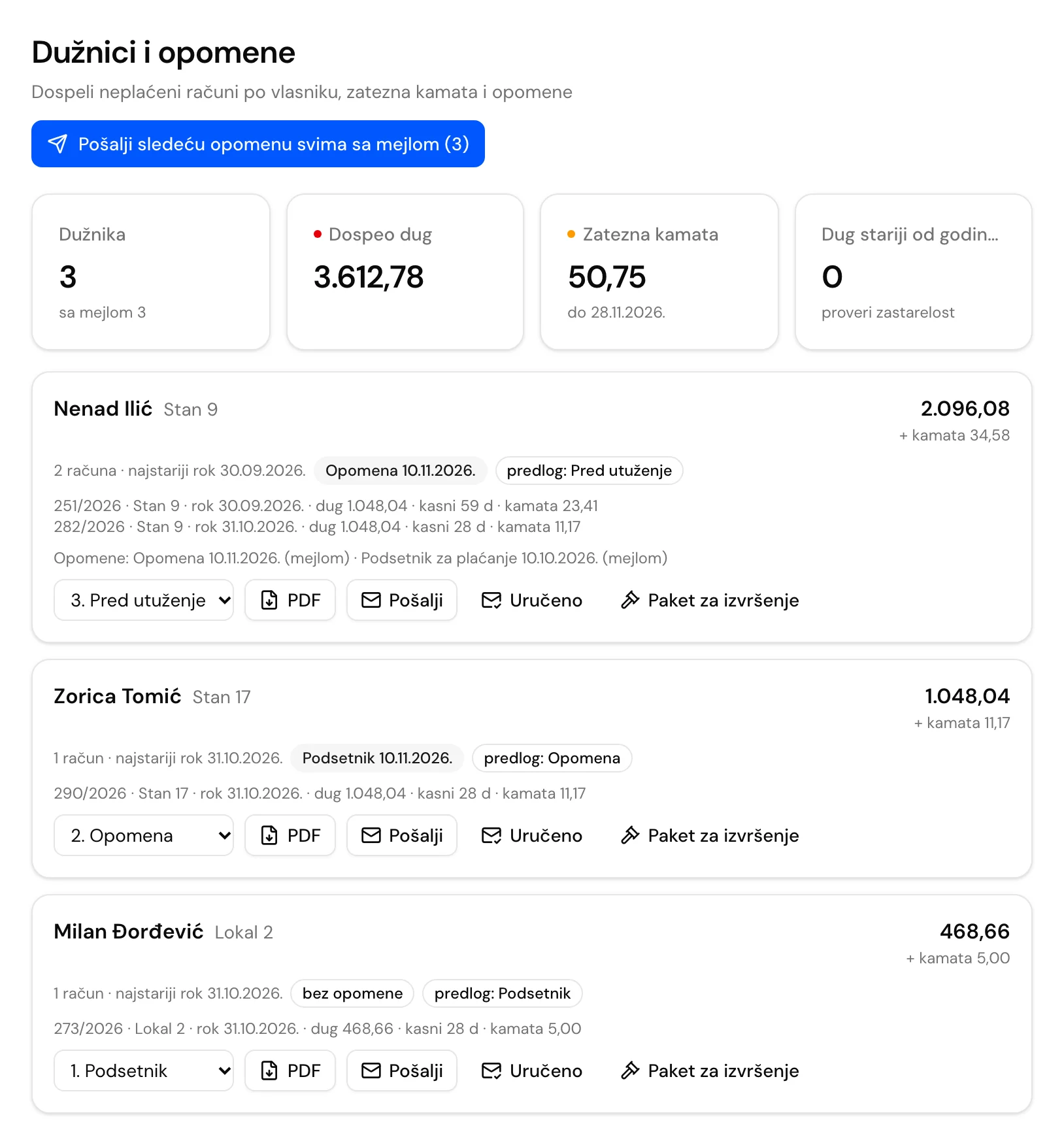
Debtors, default interest and reminders
Overdue debt by owner, with all of their units together, and a suggested next step.
Debtor list
Overdue unpaid bills by owner, the oldest due date, the last reminder and a suggested next level.
Default interest
Interest up to today at the National Bank of Serbia rates, for each bill separately.
Reminders in three levels
A payment reminder, a notice and a final notice before legal action, as a PDF with a QR code for payment. You send them by email, to one owner or to all at once, or record that a printed notice was handed over.
Enforcement package
One PDF with a summary of the claim (debt, interest, delivery of every bill and the reminders) and the bills themselves, for a lawyer or an enforcement motion.
Debt older than a year
The app marks such debt separately and suggests sending the final notice before legal action.
The assembly, its decisions and the manager’s report
What the Law on Housing and Building Maintenance asks of the manager, from data the app already has.
Manager and term
The manager and a four-year term. The app reminds you 90 days before the term ends and when the assembly has not met for more than six months.
Assembly decisions
Number, meeting date, content and the majority needed: simple, two thirds of all votes or unanimous. With the votes entered, the app says whether the decision has the majority it needs.
Voting list
A PDF of owners with one vote per unit, the quorum and the two-thirds threshold. A garage has its own vote only when it is the owner’s only unit in the building.
Annual report
The maintenance programme by purpose (plan against actual), income and spending by month, other inflows, payments by recipient, debt by unit at year end and the manager’s report, as a PDF for the assembly.
Plan for next year
A proposed maintenance programme by purpose for the next year goes into the same PDF, for the assembly to approve.
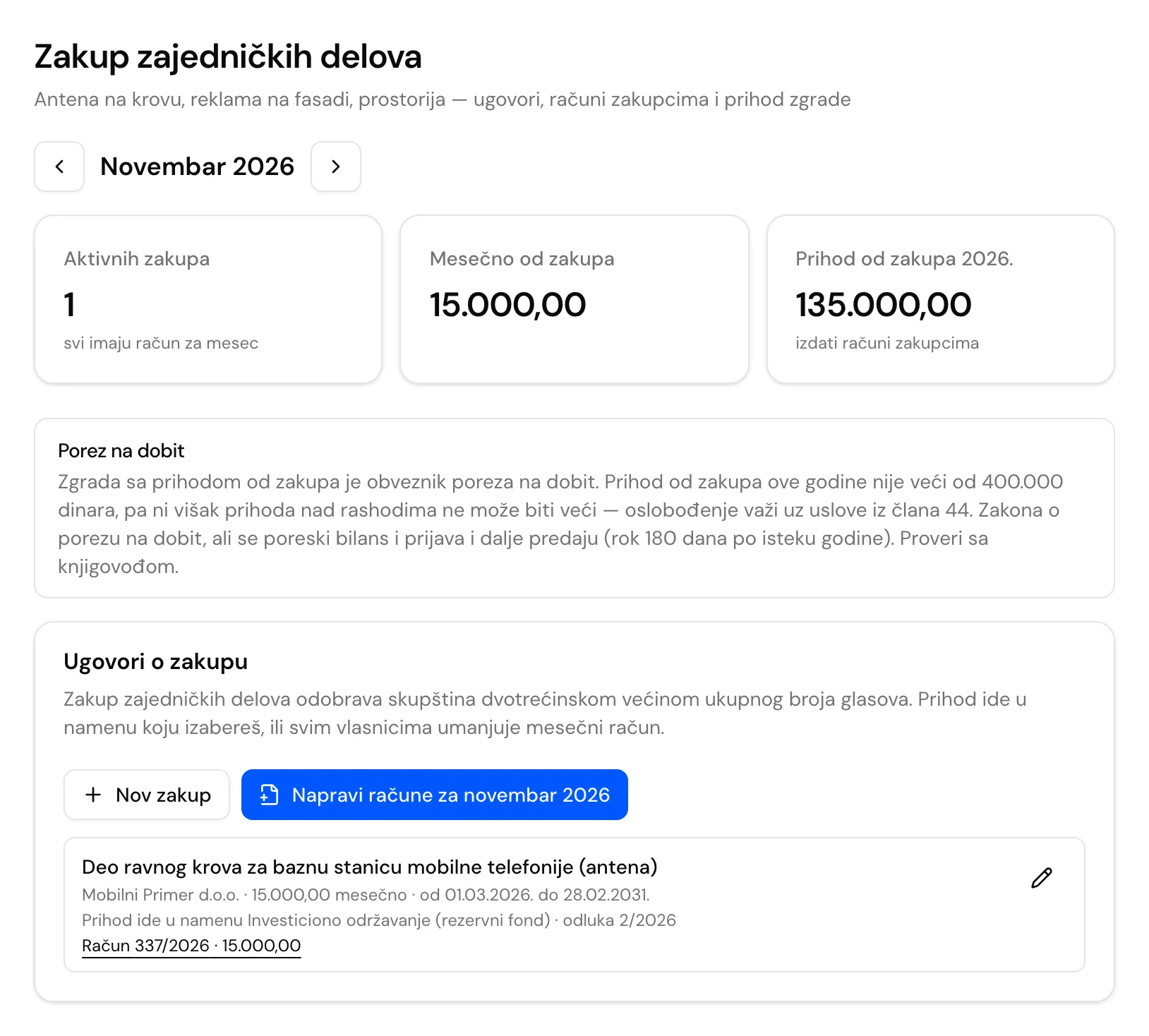
An antenna on the roof, an ad on the façade
Lease income goes to a chosen purpose or lowers every owner’s monthly bill.
Lease contract
Tenant, subject, monthly amount, period and the assembly decision. The app suggests decisions passed by two thirds of all votes, as the ministry recommends.
Bill to the tenant
With one button, a monthly bill to every active tenant, with no duplicates.
Income to a purpose
The tenant’s payment goes to the chosen purpose on its own, for example the reserve fund or the lift.
A reduction for everyone
Or the income is shared by all owners as a reduction on the monthly bill, equally per unit or per m².
Income for the year
The app shows the lease income for the year, with a note on corporate income tax.
Bank, expenses and a menu for the building
Bank
Bank statement import. “Match payments” closes bills by a unit’s reference number, and you link other payments to a bill with the app’s suggestion.
Expenses and supplier invoices
Bills for lift servicing, cleaning, shared electricity and repairs, in one place with the statements.
Each building on its own
Each building is a separate housing community with its own tax ID, bank account and price.
A menu for the building
A “Building” group in the menu: bills, units, items, budget, reports, debtors, assembly and leases. The cash register, inventory, delivery notes and KPO book are not shown.
For housing communities, step by step
Request a demo account
Tell us how many buildings you run and how many flats they have, and we open a demo account and set it up together with you.
Units and items
You import the list of flats from Excel and choose the items: current and capital maintenance and management.
Bills and payments
With one button you create the month’s bills and email or print them, and after a statement import “Match payments” closes the paid ones.
Reports
At the end of the month you send the report to owners and lock the month, and the annual report goes to the assembly.
Good to know before you start
- You pick the legal form “Housing community” on set-up, and the menu gets a “Building” group.
- The app knows the minimum maintenance amounts for Belgrade and Novi Sad. For another municipality you align the item amounts with that municipality’s decision.
- The report reads the account balance and payments from bank statements, so you import the statements every month.
- In the report for residents debt is shown by unit label, without owners’ names.
- The enforcement package prepares the documents for an enforcement motion, and the community or its lawyer starts the procedure. You add the debtor’s personal ID number and address, which the motion requires.
- The price is per building: 690 RSD a month up to 40 flats and commercial units and 990 RSD for a larger building. Garages do not count, and no VAT is added.
Works on desktop, tablet and phone – also as an app
On Android phones and tablets, get the app from Google Play (available in Serbia for now). An iPhone app is on the way; until then, open invoice.solve.rs in Safari and add it to your home screen. For Mac and Windows there is also a desktop app, with which invoices, pro formas and quotes work without internet (fiscal receipts still need internet). The interface is in Serbian; invoice PDFs can also be in English.
Get it on Google Play- Desktop
- Tablet
- Phone
- Each company’s data kept separate
- Interface in Serbian
- Cyrillic or Latin script
For housing communities: frequently asked questions
Who is this for?
For building managers chosen from the owners, professional building managers and accountants who keep housing communities. Each building is a separate company with the legal form “Housing community”.
How do owners pay?
Every flat has a fixed reference number, the same every month, so the owner can pay by standing order or by scanning the IPS QR code on the bill. After a statement import the “Match payments” button closes that unit’s unpaid bills, oldest first.
What if an owner has no email?
You download a PDF with the bills of owners without email, print them and put them in the mailboxes, then mark them as delivered with one button. The delivery date stays recorded on every bill.
How is the amount split between flats?
An item is charged per unit or per m² of floor area. Current maintenance and management go equally per unit, and capital maintenance per m², as Article 63 of the Law on Housing and Building Maintenance provides. An item can apply only to some unit types, for example garages.
What does the monthly report for residents show?
The account balance at the start and end of the month, owners’ payments by purpose, every payment with recipient and purpose, the balance by purpose and the month’s collection. Debt is shown by unit label, without names. You download the report as a PDF for the notice board or email it to the owners.
How do I collect debt?
Under Debtors you see overdue debt by owner, with default interest up to today. You send a reminder, a notice and a final notice before legal action, and for enforcement you download a package with the bills, proof of delivery and the reminders.
How does the app help with the assembly?
It keeps the manager and term, decisions with votes and a check of the required majority, and a voting list of owners as a PDF. At year end it produces the manager’s report with the maintenance programme and income and spending, as a PDF for the assembly.
What if the building leases its roof or façade?
You enter the lease contract, and the app creates a monthly bill to the tenant. The income goes to a chosen purpose or lowers every owner’s monthly bill, equally per unit or per m².
Does the app warn when an amount is below the municipal minimum?
For Belgrade and Novi Sad, yes: the app knows the minimum amounts for current and capital maintenance, taking the lift and year of construction into account, and warns when an item is below them. For another municipality you align the amounts with that municipality’s decision.
Can a bill from the app be used to collect debt?
Under the Supreme Court’s 2025 position a housing community collects debt with an enforcement motion based on an authentic document: a bill with written proof that the owner was notified. The app keeps the delivery date on every bill and builds an enforcement package with the bills, delivery records and reminders; you add the debtor’s personal ID number to the motion. The community or its lawyer starts the procedure.
How do I get started?
Tell us how many buildings you run and how many flats they have. We open a demo account and set it up together with you, and you import the list of flats from Excel. The demo account lasts 10 days.
How much does it cost?
The Housing Community plan costs 690 RSD a month per building with up to 40 flats and commercial units, and 990 RSD for a building with more than 40 of them. Garages do not count. A manager or accountant who runs several buildings pays for each one. We are not registered for VAT, so no VAT is added to the price. Annual billing costs 10 monthly payments, and we open a 10-day demo account on request.
Related modules and solutions
- BankStatements, payment matching, cash bookLearn more
- InvoicingIssued and received invoices, e-invoices, partnersLearn more
- ArchiveCompany documents, folders and searchLearn more
- For accountantsAll client companies under one login, a monthly package for the accountant, IOS statements and ledgers.Learn more
Bring your building into the app
Tell us how many buildings you run and how many flats they have, and we’ll open a demo account.
The demo account lasts 10 days. Most modules need us to set them up, so we open and set up the account together with you.