

Business software for sole traders, companies and accountants
invoice.solve.rs is the invoicing and business app we built for our own company, and now offer to others. Invoices and pro formas, SEF e-invoicing, the KPO book, bank and expenses, inventory and payroll – in one place, built for doing business in Serbia.
- Desktop, tablet and phone
- Each company’s data kept separate
- Modules tailored to your company
We open your account and trial on request. Pricing is agreed with each company.
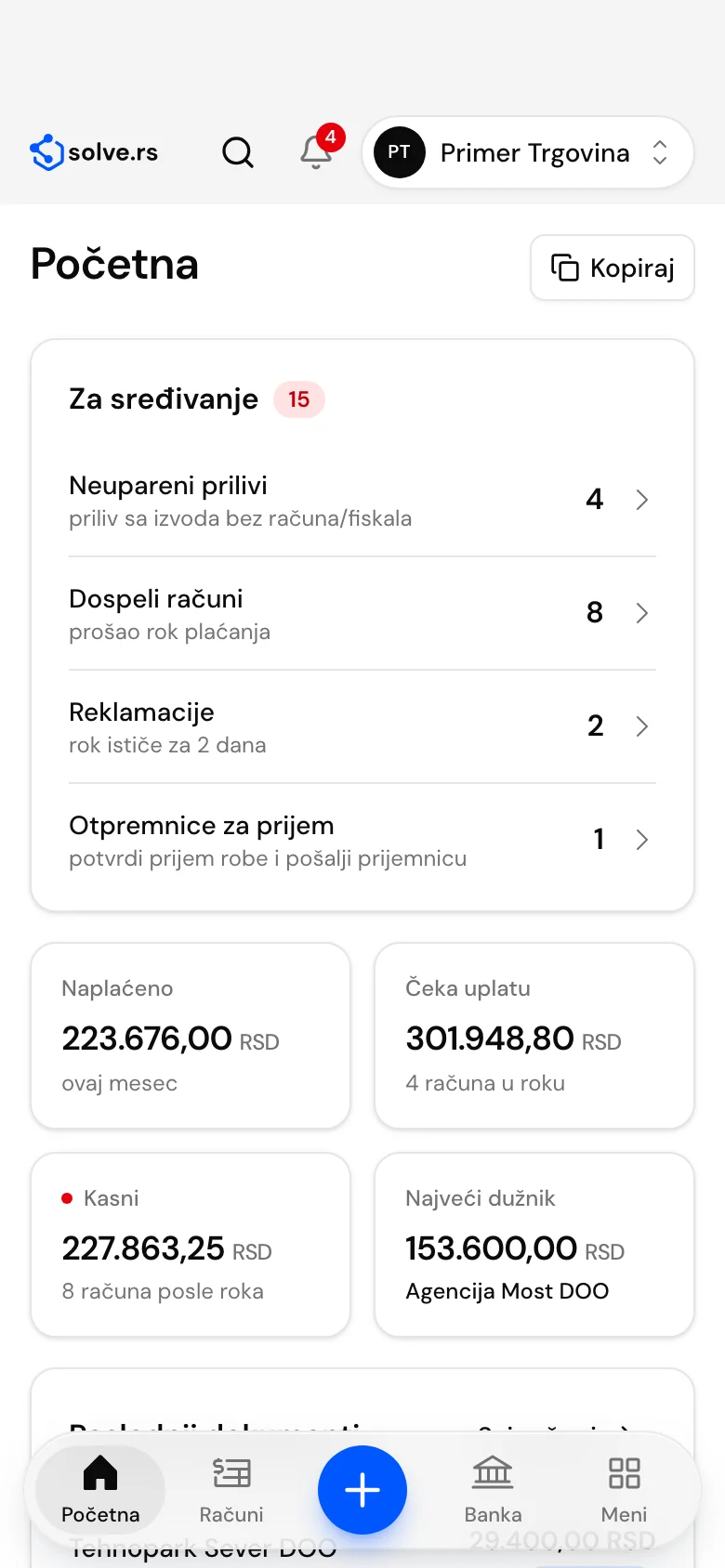
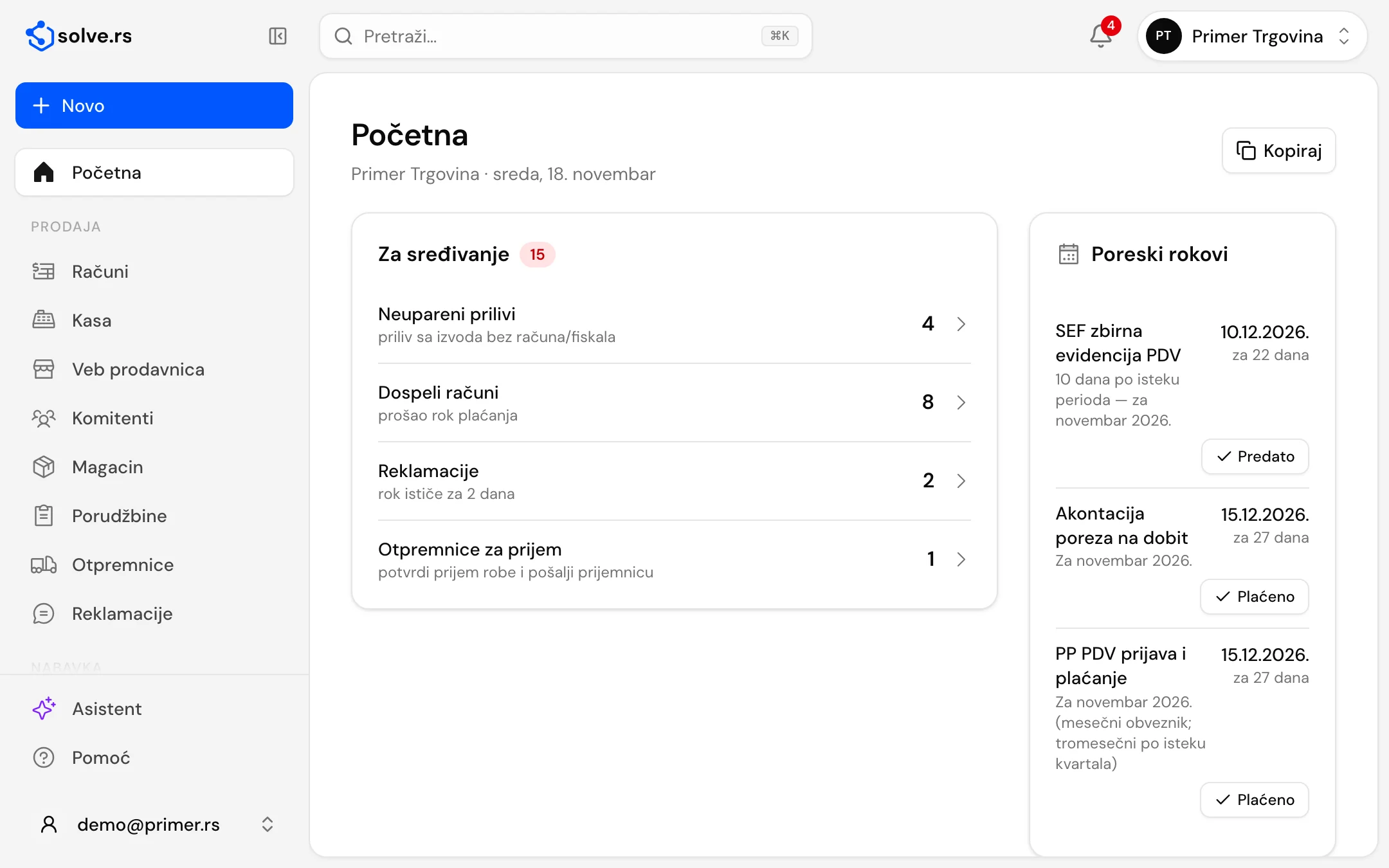
App modules: use only what you need
We enable the modules you need, and the app adapts to your company’s tax status. A flat-rate sole trader (paušalac), for example, sees invoices, pro formas and the KPO book, without bank and supplier invoices.
- Available
Invoices & pro formas
An invoice or pro forma in half a minute — from your catalog, with an IPS QR code, as a PDF, sent via SEF or email.
Sole tradersEntrepreneurs keeping booksLLCsLearn more - Available
E-invoicing (SEF)
Send and receive e-invoices without logging into the portal — statuses, accept/reject and VAT records.
Sole tradersEntrepreneursLLCsLearn more - New · beta
Delivery notes & e-Dispatch
A delivery note from an invoice, on paper in 3 copies or as an e-Dispatch via SEO, with goods receipt and the receipt advice.
VAT payers who ship goodsGoods recipientsOnline stores and retailLearn more - Available
KPO book
The Serbian sole-trader ledger fills itself from invoices and fiscal receipts: official PDF form, CSV and RSD 6M/8M limit tracking.
Sole traders (paušalci)Their accountantsLearn more - Awaiting Tax Administration approval
Fiscal cash register
Solve Kasa (approval pending): fiscal receipts via the Tax Administration’s V-PFR, no dedicated device.
Web shopsOrder-based salesSmall shops and servicesLearn more - New · beta
Complaints register
Complaints from an invoice or the till, deadlines the app tracks, a receipt confirmation and an export for the inspector.
Online storesRetailServices and hospitalityLearn more - Available
Bank & expenses
Import XML bank statements and match payments, scan fiscal receipt QR codes and manage supplier invoices.
Entrepreneurs keeping booksLLCsVAT payersLearn more - Available
Inventory & stock
Stock updates itself with every invoice, fiscal receipt and purchase invoice: recipes, goods intake, stocktaking and barcodes.
RetailWeb shopsHospitalityLearn more - Coming soon
Hospitality
Floor plan and tables, waiters with PINs, kitchen and bar tickets, QR menu and tablets as registers.
CafésRestaurantsBarsLearn more - New · beta
Payroll & travel orders
Payroll, payslips, IPS QR payment orders, PPP-PD XML and travel orders with per diems.
LLCs with employeesEntrepreneurs with employeesLearn more
Solutions by type of business
The same app with a different set of modules: pick the description that fits your company.
For sole traders
Invoices, pro formas, the KPO book, e-invoices and turnover limits in one place.
IncludesInvoices & pro formasKPO bookE-invoicing (SEF)Fiscal cash register · Coming soonLearn moreFor companies
Invoicing, SEF, bank, expenses, inventory and payroll for LLCs and sole proprietors who keep full books.
IncludesInvoices & pro formasE-invoicing (SEF)Bank & expensesLearn moreFor accountants
All client companies under one login, a monthly package for the accountant, IOS statements and ledgers.
IncludesKPO bookBank & expensesLearn moreFor associations
Members and dues, donations and grants, projects with donor reports and double-entry bookkeeping.
IncludesBank & expensesPayroll & travel orders · NewLearn more
Three plans and a register add-on
Plan prices are not published and are agreed with each company. Only the price of the Solve Kasa add-on is listed.
Paušalac
For flat-rate sole traders
Price on request
IncludesInvoices & pro formasKPO bookE-invoicing (SEF)Fiscal cash register · Coming soonLearn moreBookkeeper
For bookkeepers who run several companies
Price on request
IncludesKPO bookBank & expensesLearn moreEnterprise
For companies, LLCs and VAT payers
Price on request
IncludesInvoices & pro formasE-invoicing (SEF)Bank & expensesLearn more
Solve Kasa
An online fiscal register that runs in the browser, on desktop, tablet and phone.
Awaiting Tax Administration approval: until then it runs in demo mode only and must not be used for real sales.
What you get whichever module you use
Shared features that work the same way, whether you issue invoices, keep the KPO book or match bank statements.
Reports
Sales, collections, income and expenses, receivables aging and top lists, filtered by period. For entrepreneurs who keep books and for companies.
Document archive
Folders for contracts, tax assessments and other documents, plus an archive book in the official format with a PDF copy. Every company has it, sole traders too.
Tax calendar
Your next three deadlines based on your tax status, with a reminder 3 days ahead in the app and by email.
Roles for your team and accountant
Owner, manager, accountant, bookkeeper and a device account for the cash register. Owners and managers edit; the others can view and export PDF and CSV.
On every device
Runs in the browser on desktop, tablet and phone, and installs on your phone like an app (PWA).
Data kept separate per company
Each company sees only its own data. Access keys, such as your SEF API key, are stored encrypted.
Switching from another program
Import past invoices from CSV or PDF and numbering continues. Fiscal receipts from another ESIR come in as PDF, bank statements as XML.
Your own address
Your organization gets its own address in the app, for example primer.invoice.solve.rs.
Cyrillic or Latin script
The company picks the script: the interface, PDFs, emails and the public invoice page switch to Cyrillic, and search finds the same name in both scripts. Typed data stays as you entered it.
Mac and Windows app
Invoices, pro formas and quotes work without internet and sync later on their own. Fiscal receipts and the rest still need internet.
Accounts are opened on request, not through sign-up
There is no public sign-up for now. We open the account for your company after a short inquiry.
Request a trial account
Leave your contact details and tell us what you need: invoicing, the KPO book, e-invoicing or something else.
We open your account and trial
We enable the modules you need and send an invitation to your email.
Log in at invoice.solve.rs
Sign in with the link from the email or a password. A short onboarding walks you through your company, first customer and service.
Plan prices are agreed with each company, and the price of the Solve Kasa add-on is listed under Pricing.
Works on desktop, tablet and phone – installs like an app (PWA)
Open invoice.solve.rs in your browser and add it to your phone’s home screen. For Mac and Windows there is also a desktop app, with which invoices, pro formas and quotes work without internet (fiscal receipts still need internet). Nothing to download from an app store. The interface is in Serbian; invoice PDFs can also be in English.
- Desktop
- Tablet
- Phone
- Each company’s data kept separate
- Interface in Serbian
- Cyrillic or Latin script
Frequently asked questions about the app
Who is the app for?
Serbian sole traders (paušalci), entrepreneurs who keep books, LLCs and VAT payers, and their accountants. The app only shows what fits the company’s tax status.
How do I get an account?
Click “Request a trial account” and leave your contact details. We open the account and trial period and send you an invitation by email. There is no public sign-up for now.
How much does it cost?
The Paušalac, Bookkeeper and Enterprise plan prices are not published and are agreed with each company, and you can try the app first with a trial account. The Solve Kasa add-on costs 600 RSD per month and is awaiting Tax Administration approval.
Is there an Android or iPhone app?
The app runs in the browser and installs on your phone as a PWA: open invoice.solve.rs and add it to your home screen. It is not on Google Play or the App Store for now.
Is the fiscal cash register approved?
Not yet. The Solve Kasa application is under review by the Serbian Tax Administration, so until it is approved the register runs in demo mode only and must not be used for real sales.
Where is my data stored?
Each company’s data is kept separate and is visible only to your team and the people you give access to, such as your accountant. AI features are optional: when you use them, the document content is sent to an AI service for processing.
Can I move my data from another program?
You can import past invoices from CSV or PDF and the numbering continues. Fiscal receipts from another ESIR are imported as PDF, and bank statements as XML.
Can my accountant get access?
Yes. The company owner invites the accountant into their organization, and the accountant sees every company that invited them under one login, with view access and PDF and CSV exports.
Try the app on your own company
Send a short inquiry and we’ll open a trial account with the modules you need.
There is no public sign-up: we open the account and get back to you by email.