

Double-entry bookkeeping for companies and associations
Journal entries, a general ledger and financial statements for APR, in the same app where you issue invoices and import bank statements. Invoices, statements, the cash book and payroll become proposed entries, and your accountant checks and posts them.
- LLCs (DOO)
- Entrepreneurs who keep double-entry books
- Associations, clubs and foundations
- Accountants and agencies
The demo account lasts 10 days and we set it up together with you. Plan prices exclude VAT and are on the Pricing page.
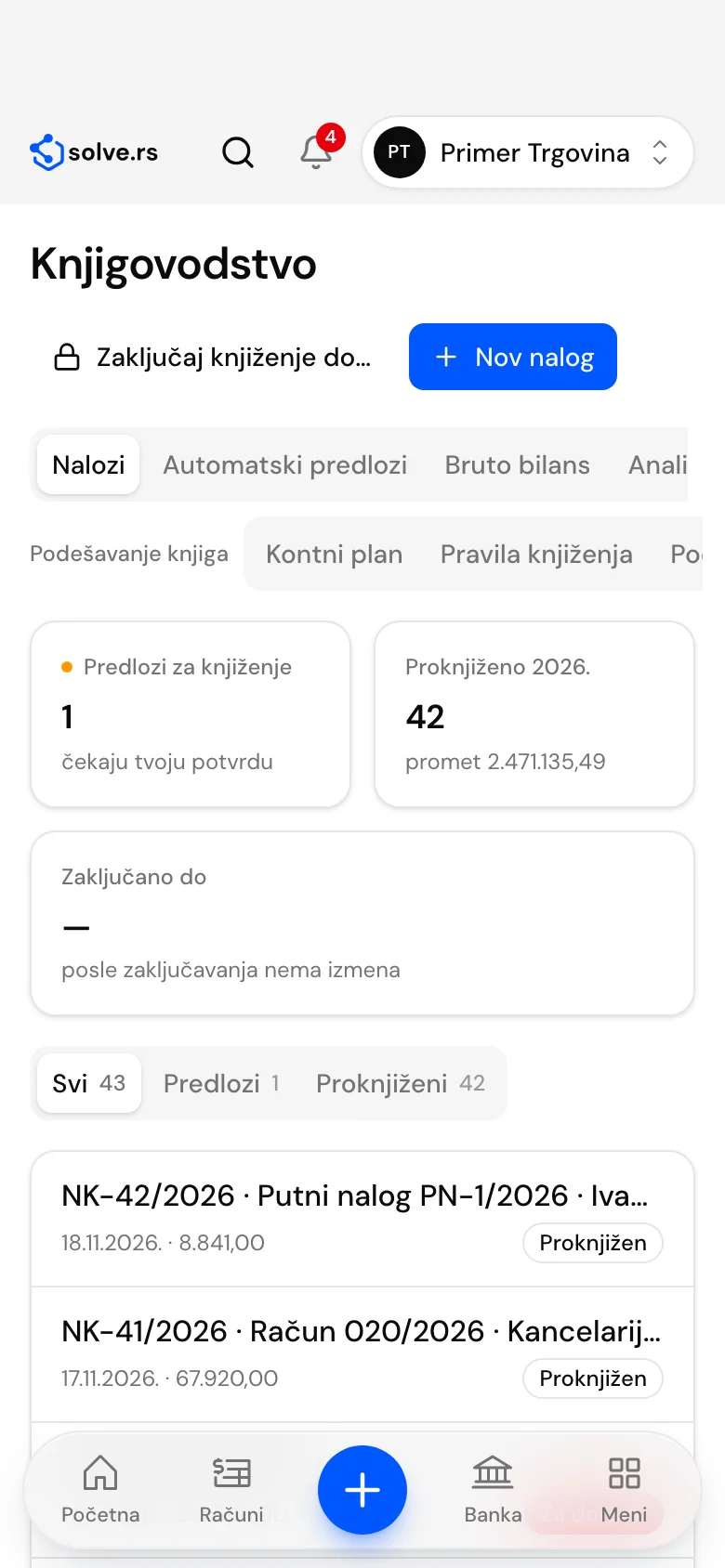
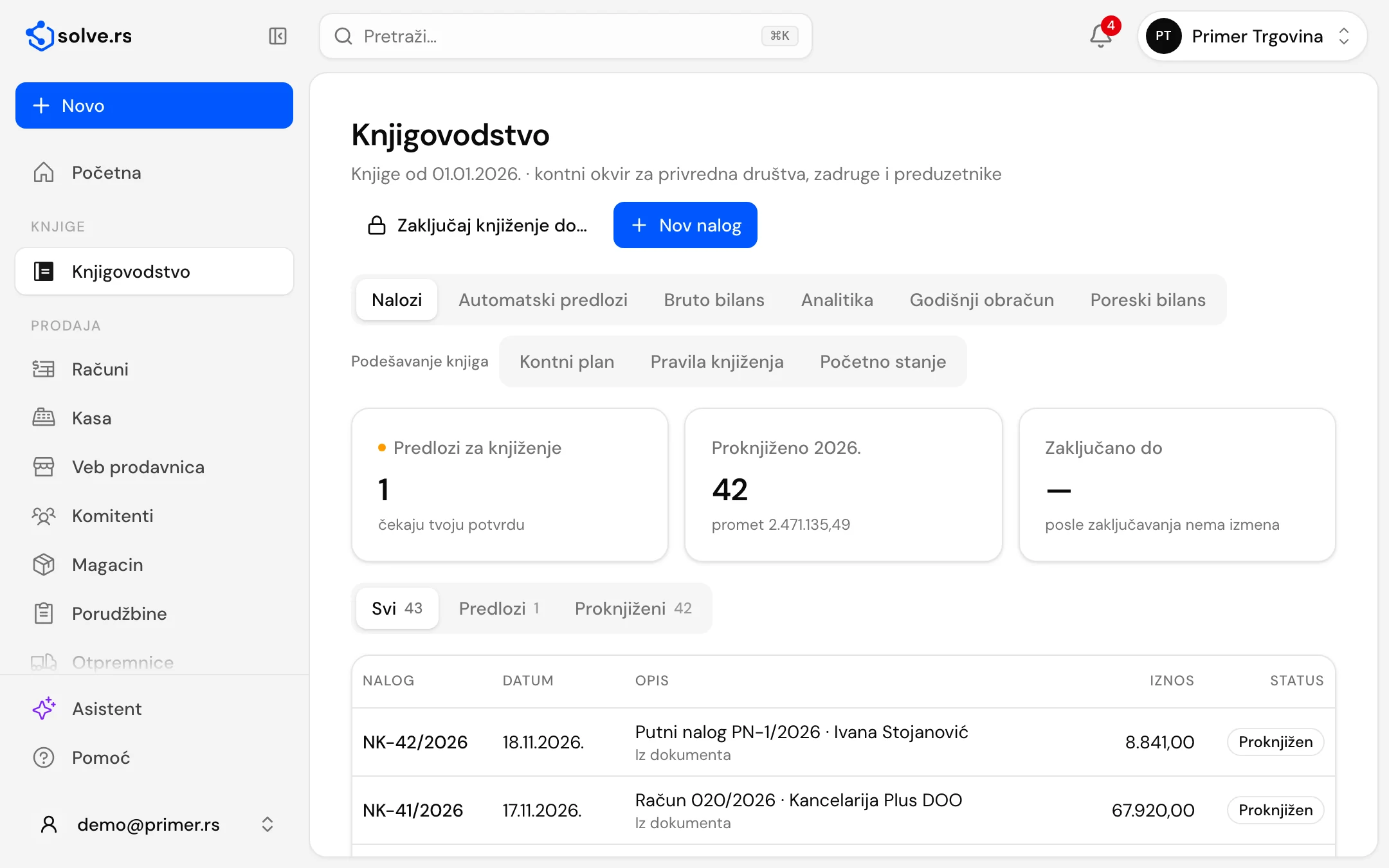
At a glance
- for companies and entrepreneurs, and for other legal entities
- 2 charts of accounts
- entry number per year, a posted entry is never edited
- NK-1/2026
- proposed entries from invoices, statements, the cash book, payroll and goods
- Automatic
- balance sheet, income statement and statistical report
- APR
Journal entries and the chart of accounts
Books are opened per company, with the chart of accounts that fits it: for companies, cooperatives and entrepreneurs, or for other legal entities.
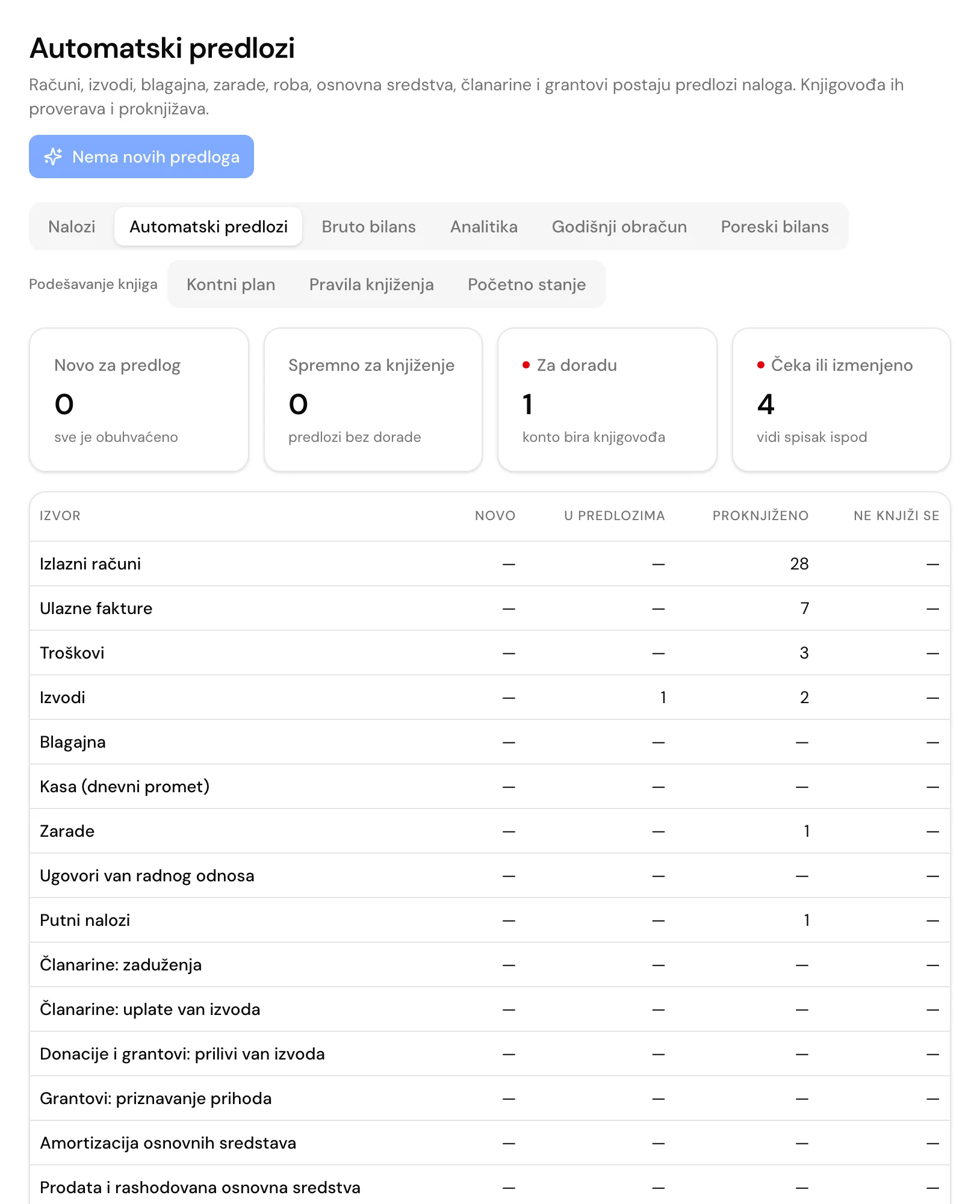
A manual entry
Debit and credit lines with a balance check. An entry is posted when the totals are equal and it has at least two lines, and a posted entry gets a yearly number, for example NK-1/2026.
Reversal instead of editing
A posted entry is neither edited nor deleted: a correction is a reversal entry with the sides swapped. A period is locked up to a chosen date, so it takes no new entries.
Chart of accounts
Synthetic accounts under the chart-of-accounts rulebook (Official Gazette of RS 89/2020). You add analytic accounts yourself, for example 2410 or 241-1, and switch them off when not needed.
Opening balance from your old program
A closing worksheet or trial balance is imported as a proposed “Opening balance” entry, and analytic accounts that do not exist are created for you. Customers and suppliers, open items and fixed assets move over through “Switching from another program”.
Who does what
Entries are prepared by the owner, manager, accountant and bookkeeper, and posted, reversed and locked by the owner, accountant and bookkeeper.
Proposed entries from the business you already run
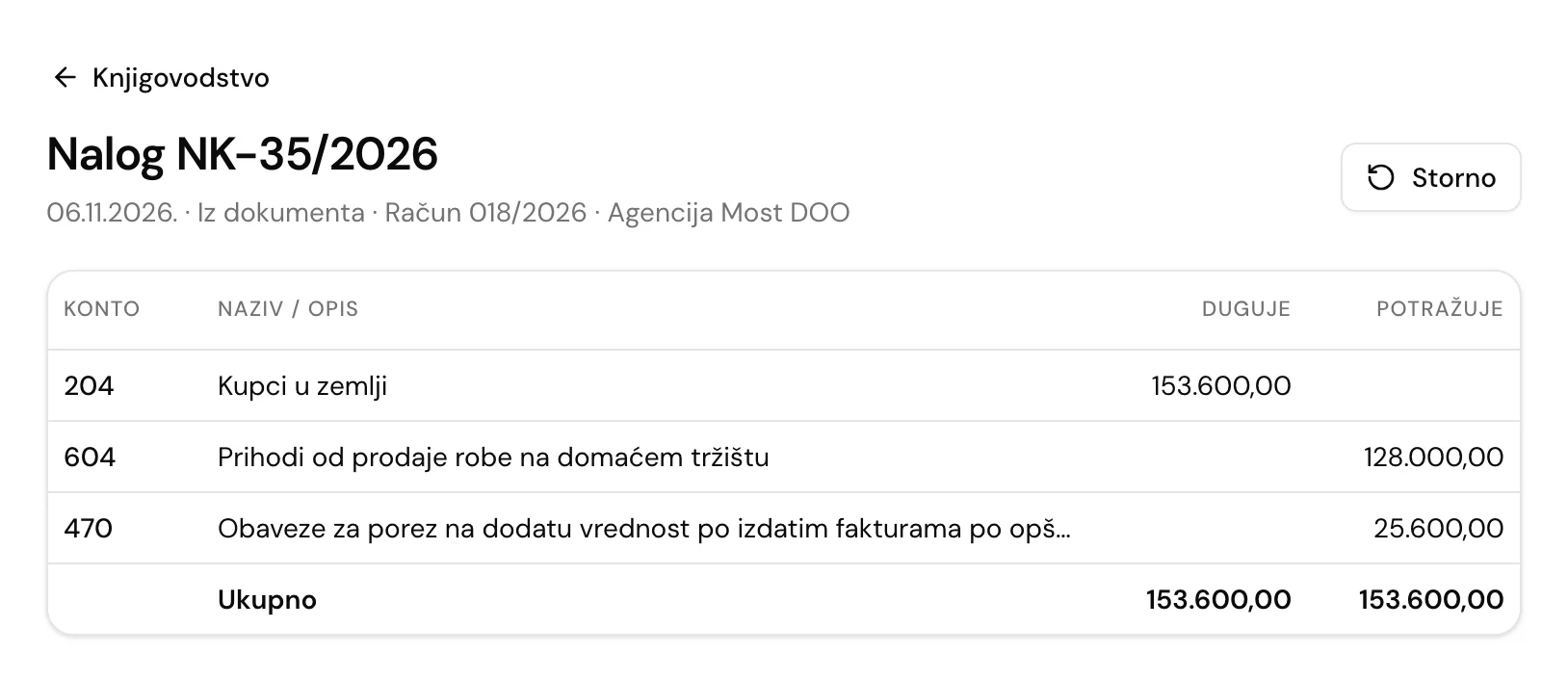
The app builds proposed entries from the data you already have. A proposal enters the books only once an authorised person posts it.
Invoices, statements, cash book, payroll
Issued invoices, received invoices, expenses, bank statements, the cash book, daily register turnover, payroll, contracts outside employment and travel orders.
Goods and fixed assets
Retail calculations and price changes, discharge of register sales and of goods by wholesale invoices, depreciation from the fixed-asset register and sold or written-off assets. Proposals are made for completed months.
Membership fees, donations and grants
For associations: membership charges and payments, donation and grant receipts, and recognition of grant income as it is spent.
Posting rules
The company changes the accounts proposals use on the “Posting rules” tab. A change applies to proposals made from that moment.
Rework and source changes
A proposal without rework is ready to post, and where the account is unclear the bookkeeper picks it. If a source changes after posting, the app says a reversal and a new proposal are needed.
General ledger, financial statements and the annual closing for APR
Books and forms are calculated from posted entries.
Journal, general ledger and closing worksheet
You download them for any year as PDF or Excel.
Trial balance and account cards
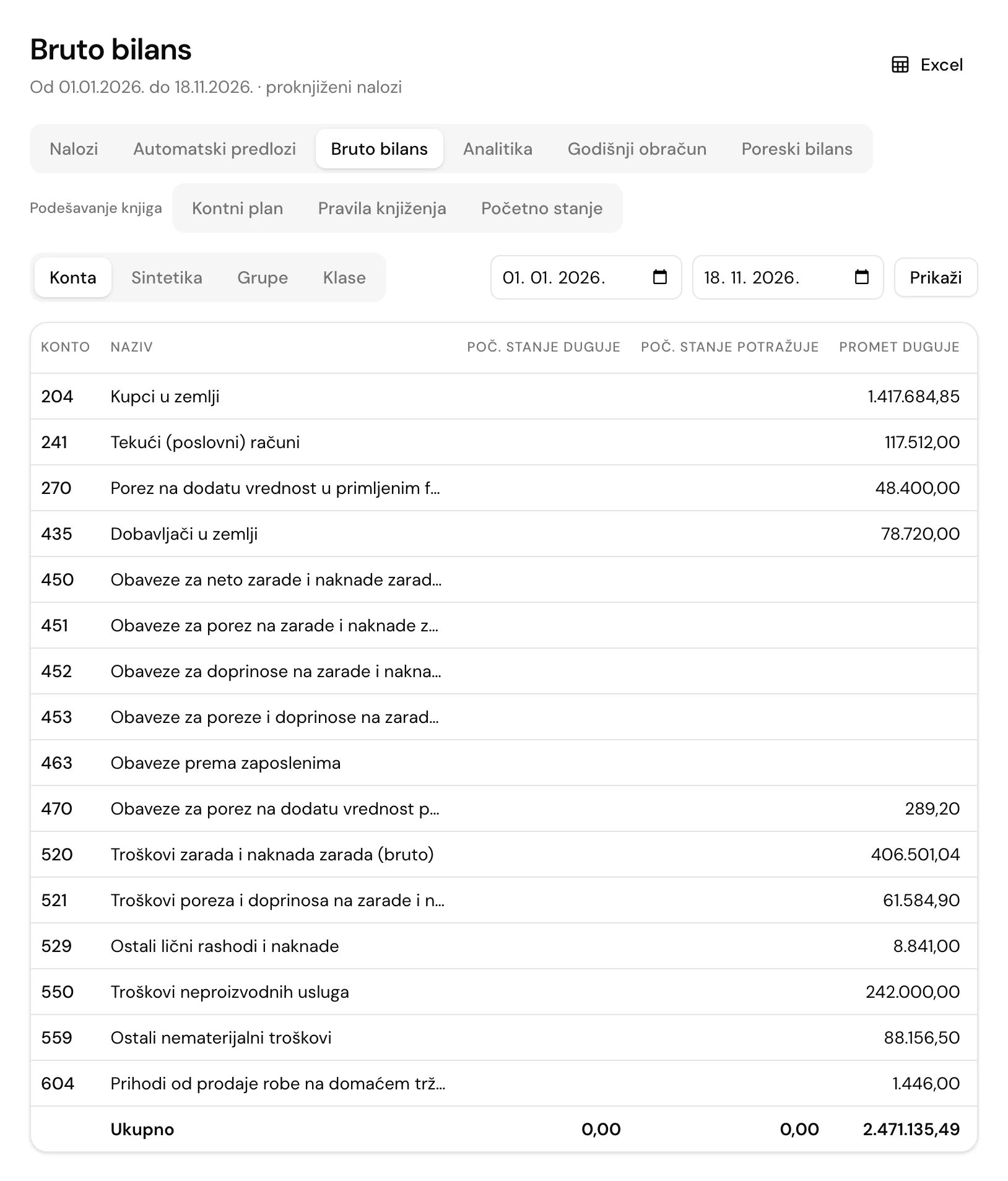
A trial balance for a period by account, synthetic account, group or class: opening balance, turnover, balance and a balance check, exportable to Excel. An account card shows the carried-over balance, lines and balance.
Analytic cards
Cards for customers and suppliers, and for associations also members and projects.
The annual closing for APR
The balance sheet, income statement and statistical report are calculated from the books, in thousands of dinars, with a closing entry and carry-forward of the opening balance into the new year. The app checks that assets equal liabilities and that the statistical report agrees with the statements, and you download the list of AOP positions to enter into APR as Excel.
Tax balance for companies
Preparation of the PB 1 form and profit tax from the books and the fixed-asset register, with manual adjustments and tax losses carried forward.
Double-entry bookkeeping, step by step

Open the books
We enable double-entry bookkeeping for the company, and you open the books: the company gets the chart of accounts that fits it.
Enter the opening balance
Import a closing worksheet or trial balance from your old program, then check and post the proposal.
Review the proposals
Invoices, statements, the cash book and payroll become proposed entries. The bookkeeper checks and posts them.
Close the year
A closing entry, carry-forward of the opening balance and financial statements for APR from posted entries.
Good to know before you start
- Double-entry bookkeeping is enabled per company. It is included in the Association plan, and an add-on to Entrepreneur and DOO.
- An automatic proposal enters the books only once the owner, accountant or bookkeeper posts it.
- You open the books for each company separately, and bring the opening balance from your old program or enter it by hand.
Works on desktop, tablet and phone – also as an app
On Android phones and tablets, get the app from Google Play (available in Serbia for now). An iPhone app is on the way; until then, open invoice.solve.rs in Safari and add it to your home screen. For Mac and Windows there is also a desktop app, with which invoices, pro formas and quotes work without internet (fiscal receipts still need internet). The interface is in Serbian; invoice PDFs can also be in English.
Get it on Google Play- Desktop
- Tablet
- Phone
- Each company’s data kept separate
- Interface in Serbian
- Cyrillic or Latin script
Double-entry bookkeeping: frequently asked questions
What is double-entry bookkeeping?
Every business event is posted to two accounts, debit and credit, in an entry whose totals are equal. Entries produce the general ledger, the trial balance and financial statements.
Who is double-entry bookkeeping in the app for?
LLCs (DOO), entrepreneurs who keep double-entry books, associations, sports clubs and foundations. Flat-rate traders keep the KPO book.
Which chart of accounts is used?
The chart of accounts from the rulebook (Official Gazette of RS 89/2020): for companies, cooperatives and entrepreneurs, or for other legal entities, depending on the company. You add analytic accounts yourself.
Can I bring the opening balance from another program?
Yes. A closing worksheet or trial balance is imported as a proposed “Opening balance” entry, and customers and suppliers, open items and fixed assets move over through “Switching from another program”. Check the proposal and post it.
What does the app propose for posting by itself?
Entries from invoices, received invoices, expenses, bank statements, the cash book, the register, payroll, contracts, travel orders, fixed assets and goods, and for associations also from membership fees, donations and grants. The owner, accountant or bookkeeper posts them.
What do I get for APR?
The balance sheet, income statement and statistical report from posted entries, as PDF and Excel, with a list of AOP positions to enter into the APR application. The deadline for the annual financial statements is 31 March.
Open the books on a demo account
Tell us what kind of company you have and how you keep the books today. The demo account lasts 10 days, and we set it up together.
The demo account lasts 10 days. Most modules need us to set them up, so we open and set up the account together with you.
Related modules and solutions
- For associationsMembers and dues, donations and grants, projects with donor reports and double-entry bookkeeping.Learn more
- For accountantsAll client companies under one login, a monthly package for the accountant, IOS statements and ledgers.Learn more
- BankStatements, payment matching, cash bookLearn more
- VAT recordsVAT records and the summary record on SEFLearn more