

WooCommerce fiscalisation: a receipt for every order
The “Solve.rs Fiskalizacija” plugin from the wordpress.org directory connects your WooCommerce shop to Solve Kasa. When an order reaches the status you choose, the register issues a fiscal receipt through the Serbian Tax Administration’s V-PFR, and the receipt number and verification link come back to the order and the customer email.
- WooCommerce shops
- Online-only sales
- Cash on delivery, card and bank transfer
- Shop accountants
The demo account lasts 10 days and we set it up together with you. Plan prices are on the Pricing page, and no VAT is added to them.
Solve Kasa is approved by the Tax Administration (ESIR 1715). To issue real fiscal receipts, your company gets its own security element with a PAK from the Tax Administration, and we help with the request. Until then the plugin works with the demo register, which issues test receipts.
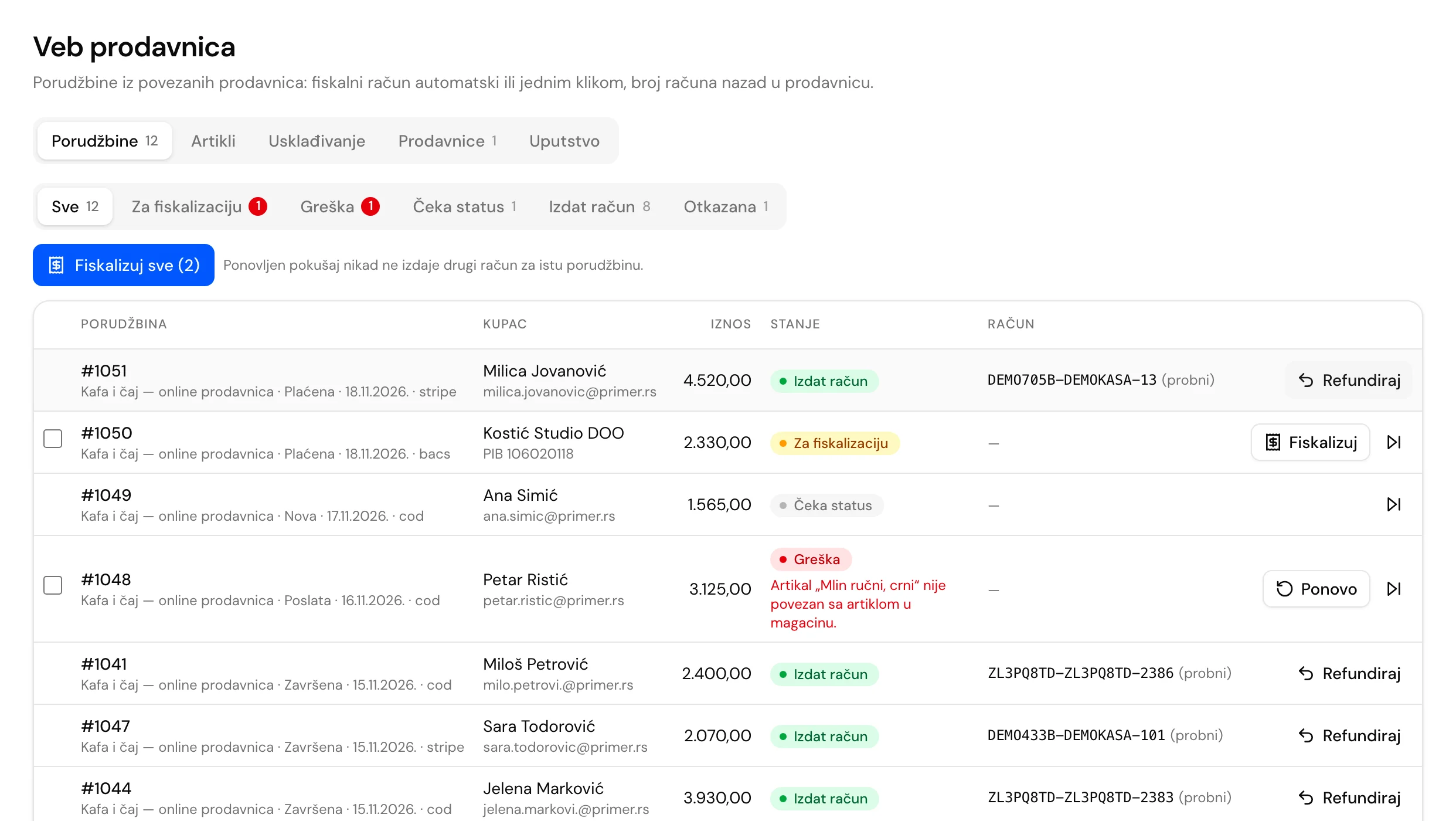
At a glance
- per order, even when a request is repeated
- 1 receipt
- paid, shipped or completed: you choose when
- 3 statuses
- receipts via the Tax Administration, no register hardware
- V-PFR
- classic and block checkout, new order tables
- HPOS
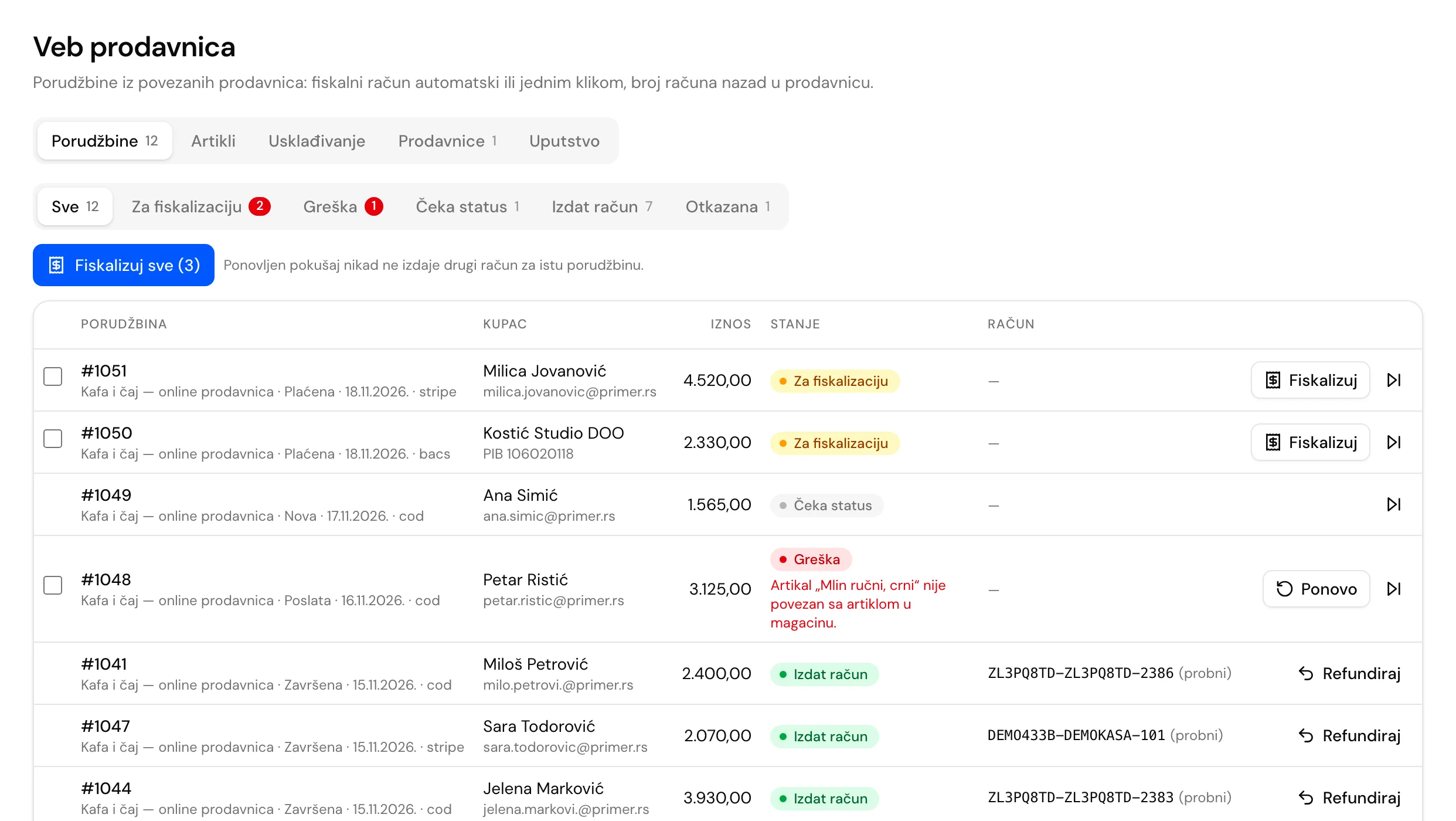
The receipt is issued when the order reaches your status
The plugin sends the order to Solve.rs when it is placed and on every status change. The register issues the receipt with the same calculation as when a cashier rings it up, and the shop gets the receipt number back.
You choose the moment
The receipt is issued when the order is paid, shipped or completed: automatically or with one click on “Fiskalizuj” (Fiscalise) in Solve.rs.
Number and link on the order
The receipt number (PFR) and the verification link on the Tax Administration website are saved on the order and shown to the customer in their account and in the shop’s emails.
Receipt PDF with the order
Every receipt PDF is kept with the order. Send it with one click or attach it to the WooCommerce emails, and the customer downloads it from their account.
A cancelled order gets a refund
When you cancel or refund an order, the register issues a refund receipt that references the first one.
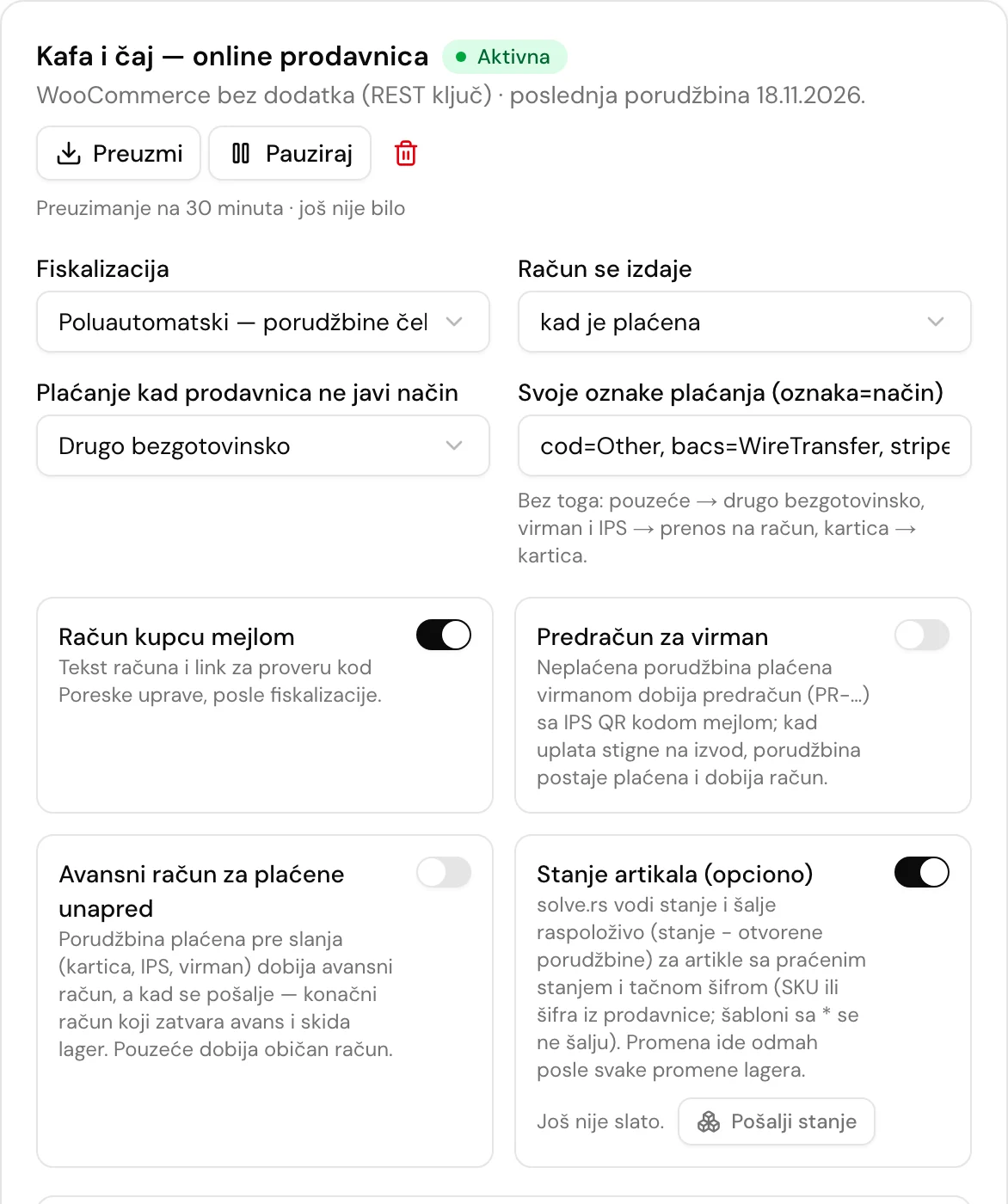
Cash on delivery, card and bank transfer
Each payment method in the shop is linked to a payment method on the receipt. You set the map per shop.
Cash on delivery
WooCommerce marks a cash-on-delivery order as “Processing” right away, although nothing is paid yet. The plugin sends it as a new order, and the receipt is issued when the order is shipped or completed.
Payment map
Card, cash on delivery and bank transfer get the payment method you choose. Confirm the choice for cash on delivery with your accountant before the first real receipts.
Bank transfer with an IPS QR code
Optionally, a bank-transfer order gets a pro forma invoice with an IPS QR code, and the receipt is issued when the payment arrives.
Advance for prepaid orders
Optionally, an order paid before shipping gets an advance receipt, and the final receipt follows when it is shipped.
Company tax number at checkout
Optionally, a PIB field at checkout: a company that buys gets a receipt with its tax number.
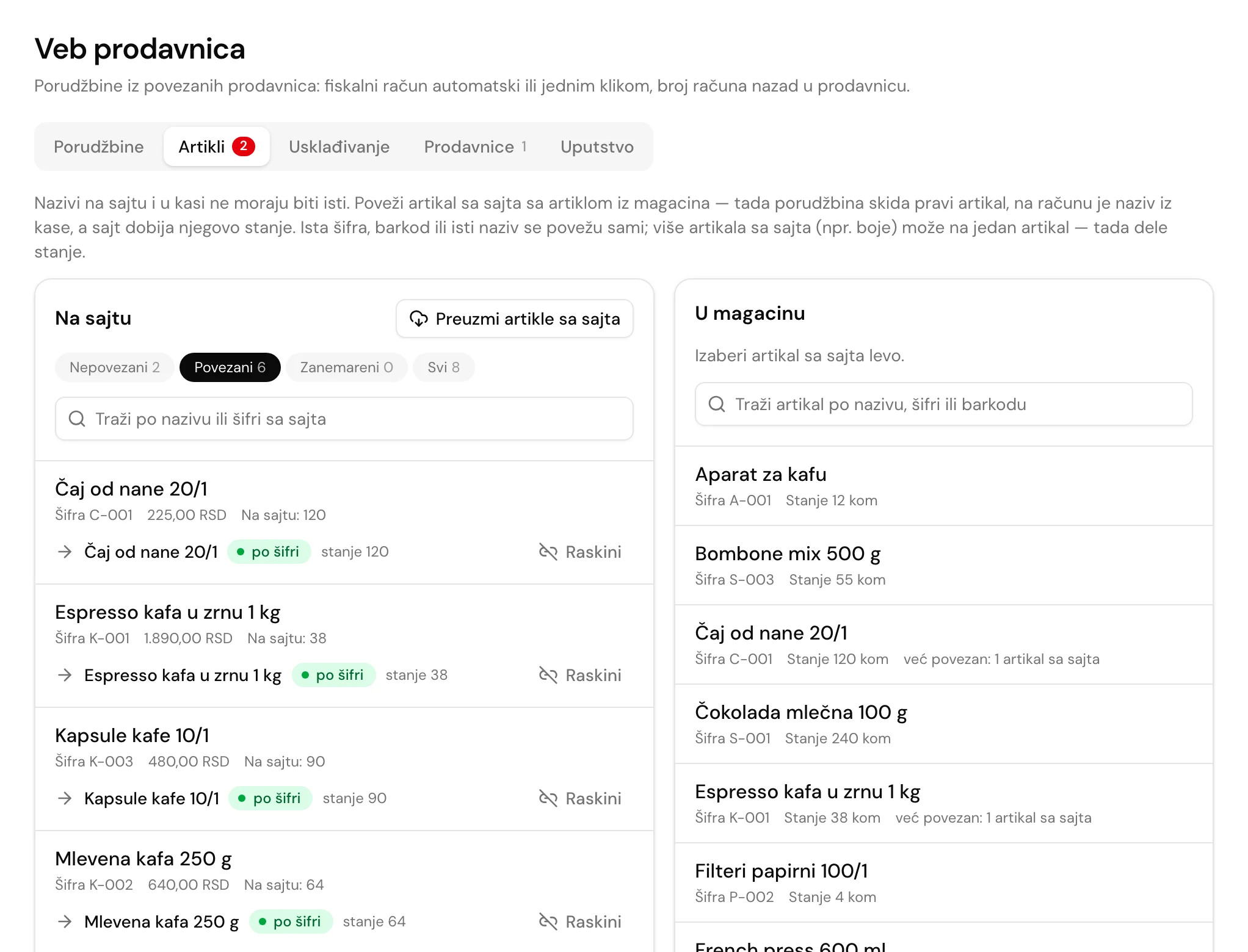
One stock for the shop, the register and the site
Stock is optional, per shop. When you turn it on, Solve.rs keeps the main stock and the shop gets the available quantity.
Products are linked even when names differ
The plugin sends products to Solve.rs, and you link them with inventory even when names and SKUs differ.
Stock goes to the site
The shop gets the stock minus open orders, so the store, the register and the site never sell the same item twice.
Check before the order
Before the customer places the order, the cart checks stock in Solve.rs.
What your shop needs
WooCommerce 8.2 or newer
WordPress 6.4 or newer and PHP 7.4 or newer. Works with the classic and the block checkout and with the new order tables (HPOS).
An https site
Solve.rs sends receipt numbers and stock back to your site, so the site must run on https.
Signed callbacks
Callbacks from Solve.rs are signed with the shop’s secret, so the site accepts only genuine ones.
New orders only
Only orders placed after connecting are sent, so older orders are never fiscalised twice.
Shopify and your own site
Shopify connects through a custom app in its admin, and your own site through the HTTP API. The plugin is for WooCommerce only.
Key and secret are shown once
If you lose them, make new ones on the shop card and paste them into WooCommerce again.
WooCommerce fiscalisation, step by step
Install the plugin
In WordPress: Plugins → Add New → “Solve.rs Fiskalizacija”, then activate it.
Connect the shop in Solve.rs
Veb prodavnica (Web shop) → Prodavnice (Shops) → Poveži prodavnicu (Connect a shop) → “WooCommerce — dodatak solve.rs”. Note the key and secret: they are shown once.
Paste them into WooCommerce
WooCommerce → Solve.rs: paste the key and secret and save. The callback address is set automatically.
Choose when the receipt is issued
On the shop card: when paid, shipped or completed, automatically or with one click.
A test order
Place an order on the demo register, check the receipt number and link on the order, then switch to the real register.
Good to know before you start
- Sales to consumers over the internet must be fiscalised, and the seat you sell from counts as a retail outlet. For online-only sales the law does not require a device with a local processor (L-PFR), so a register working through V-PFR is enough.
- Real fiscal receipts need your company’s security element with a PAK from the Tax Administration. We help with the request and the setup.
- We do the first connection together with you, with a test order on the demo register.
Works on desktop, tablet and phone – also as an app
On Android phones and tablets, get the app from Google Play (available in Serbia for now). An iPhone app is on the way; until then, open invoice.solve.rs in Safari and add it to your home screen. For Mac and Windows there is also a desktop app, with which invoices, pro formas and quotes work without internet (fiscal receipts still need internet). The interface is in Serbian; invoice PDFs can also be in English.
Get it on Google Play- Desktop
- Tablet
- Phone
- Each company’s data kept separate
- Interface in Serbian
- Cyrillic or Latin script
WooCommerce fiscalisation: frequently asked questions
Do I need a fiscal device for a WooCommerce shop?
No. Solve Kasa is an online register (ESIR) that issues receipts through the Tax Administration’s V-PFR. For online-only sales the law does not require a device with a local processor. If you also have a physical store, the rules for a retail outlet apply to it.
When is the fiscal receipt issued?
When the order reaches the status you choose in Solve.rs: paid, shipped or completed. The receipt is issued automatically or with one click on “Fiskalizuj” (Fiscalise).
How does the plugin handle cash on delivery?
WooCommerce marks a cash-on-delivery order as “Processing” right away, although the customer has not paid yet. The plugin sends it as a new order, and the receipt is issued when it is shipped or completed. You choose the payment method on the receipt in the payment map; confirm it with your accountant before the first real receipts.
How does the customer get the receipt?
The verification link on the Tax Administration website is on the order in the customer’s account and in the shop’s emails. You can attach the receipt PDF to the WooCommerce emails or send it with one click.
What happens when I cancel an order?
A cancelled or refunded order gets a refund receipt that references the first one, and its number is saved on the order.
Does the plugin change stock in the shop?
Only if you turn on stock in Solve.rs. Then Solve.rs is the main stock and sends the shop the available quantity: stock minus open orders.
Where do I find the plugin?
In the wordpress.org directory as “Solve.rs Fiskalizacija” (wordpress.org/plugins/solve-rs-fiskalizacija). Install it from WordPress: Plugins → Add New. The plugin settings are in English; a Serbian translation has been submitted to translate.wordpress.org.
How much does it cost?
The WordPress plugin is free. Receipts are issued by Solve Kasa, so you need the register and the Web shop module: Web shop is a 290 RSD monthly add-on, the register with inventory is a 250 RSD monthly add-on to the Sole Trader, Entrepreneur and LLC plans, and the stand-alone Cash Register plan is 990 RSD a month. We are not registered for VAT, so no VAT is added to the prices.
Are orders from before the connection fiscalised?
No. Only orders placed after connecting are sent, so older orders are never fiscalised twice.
Connect your shop to the demo register
Request a 10-day demo account: connect the shop, place a test order and see the receipt number on the order. Once your company has its security element with a PAK, the receipts become real.
The demo account lasts 10 days. Most modules need us to set them up, so we open and set up the account together with you.
Related modules and solutions
- Fiscal registerBrowser fiscal register, web shopLearn more
- InventoryItems and services, KEP, recipes, stocktakingLearn more
- FreeCOD matchingSplits D Express bulk paymentsLearn more
- E-commerce SolutionsA custom online store wired from cart to doorstep: admin, D Express delivery, fiscal receipts from our POS, SEO and tracking of the whole purchase.Learn more