

Splitting D Express cash-on-delivery payments by parcel
D Express pays several cash-on-delivery (COD) amounts in one transfer, so your statement shows only the total. Degrupiši uses the payment reference number to fetch the list of COD amounts by parcel and matches each to a fiscal receipt of the same amount. You check the proposal and link the receipts to the payment in one click.
- Online stores with COD
- Retail
- Accountants
The demo account lasts 10 days and we set it up together with you. Plan prices exclude VAT and are on the Pricing page.
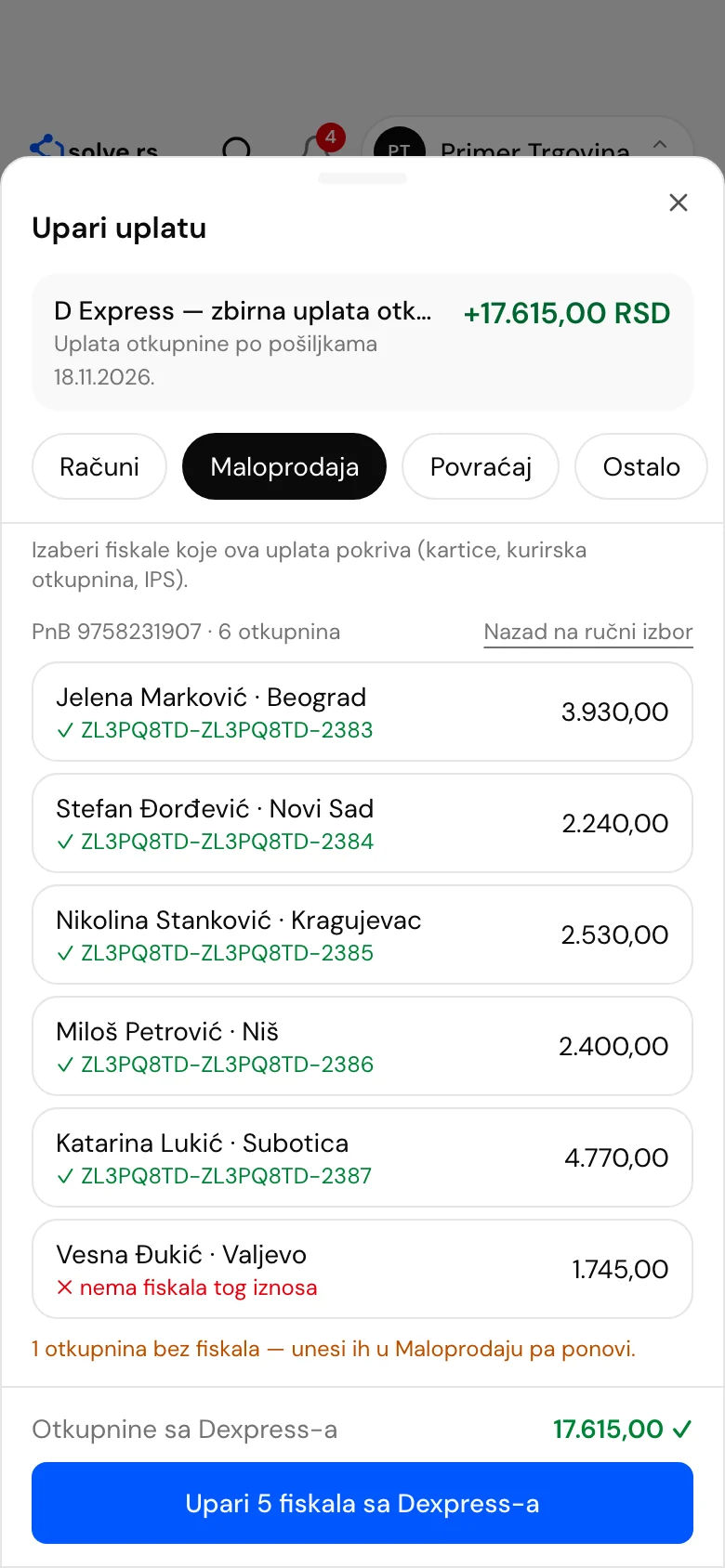
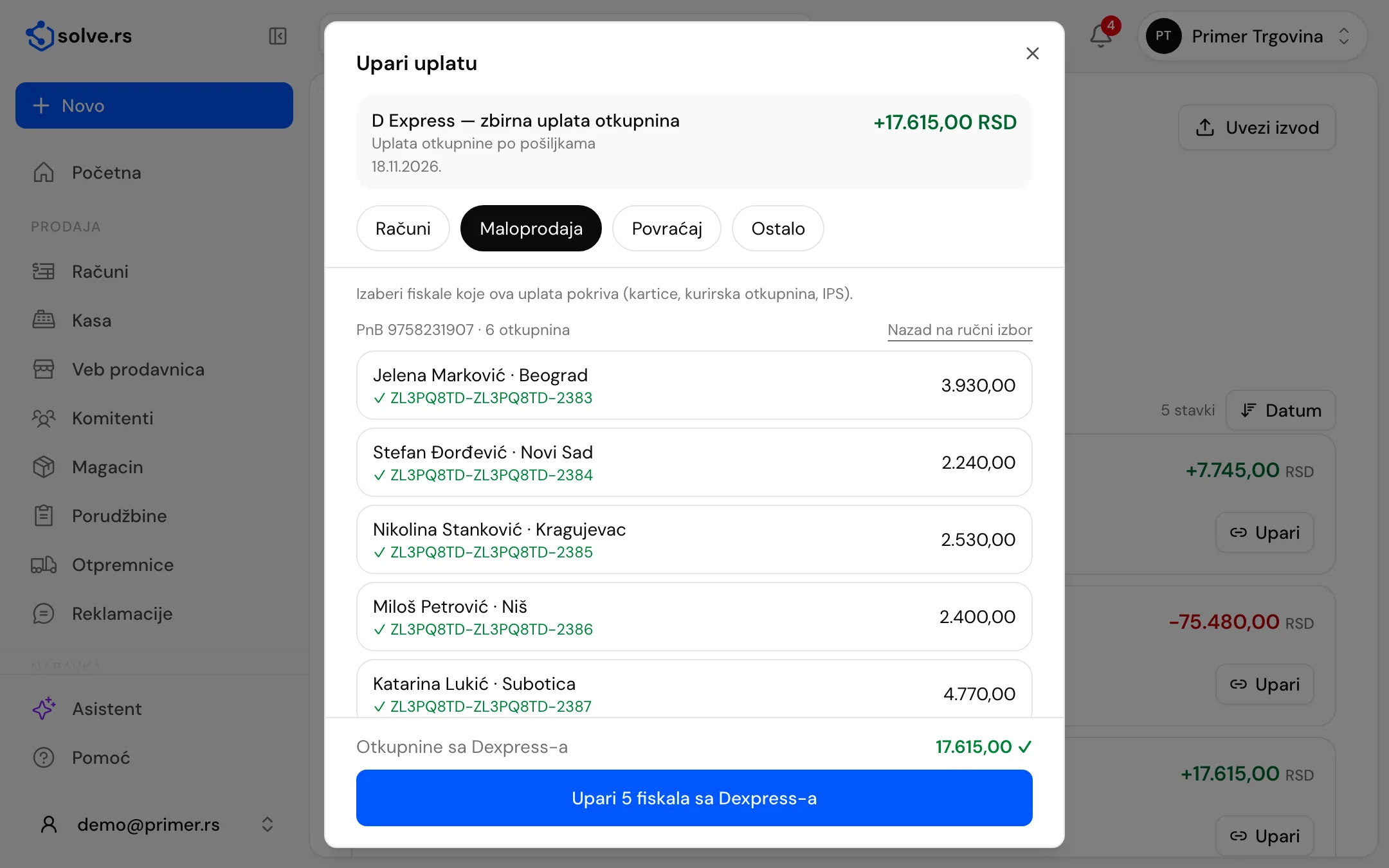
At a glance
- one D Express payment, many COD amounts
- 1 → N
- recipient, town and amount of each COD
- By parcel
- each COD matched to its fiscal receipt
- Exact amount
- COD total against the statement payment
- Total check
One payment, a list of COD amounts
D Express pays out COD amounts in bulk, under one payment reference number. The list by parcel comes back from that.
A list by parcel
For a grouped payment you get the COD amount per parcel: recipient, town and amount. The list is requested by the payment reference number and your company’s bank account.
No access credentials
You do not enter a password or key for D Express. Only the account number and the payment reference number are sent, and only when you click “Split from D Express”.
Total check
The COD total is compared with the payment amount on the statement. When they match you see a tick, otherwise you see the payment amount as well.
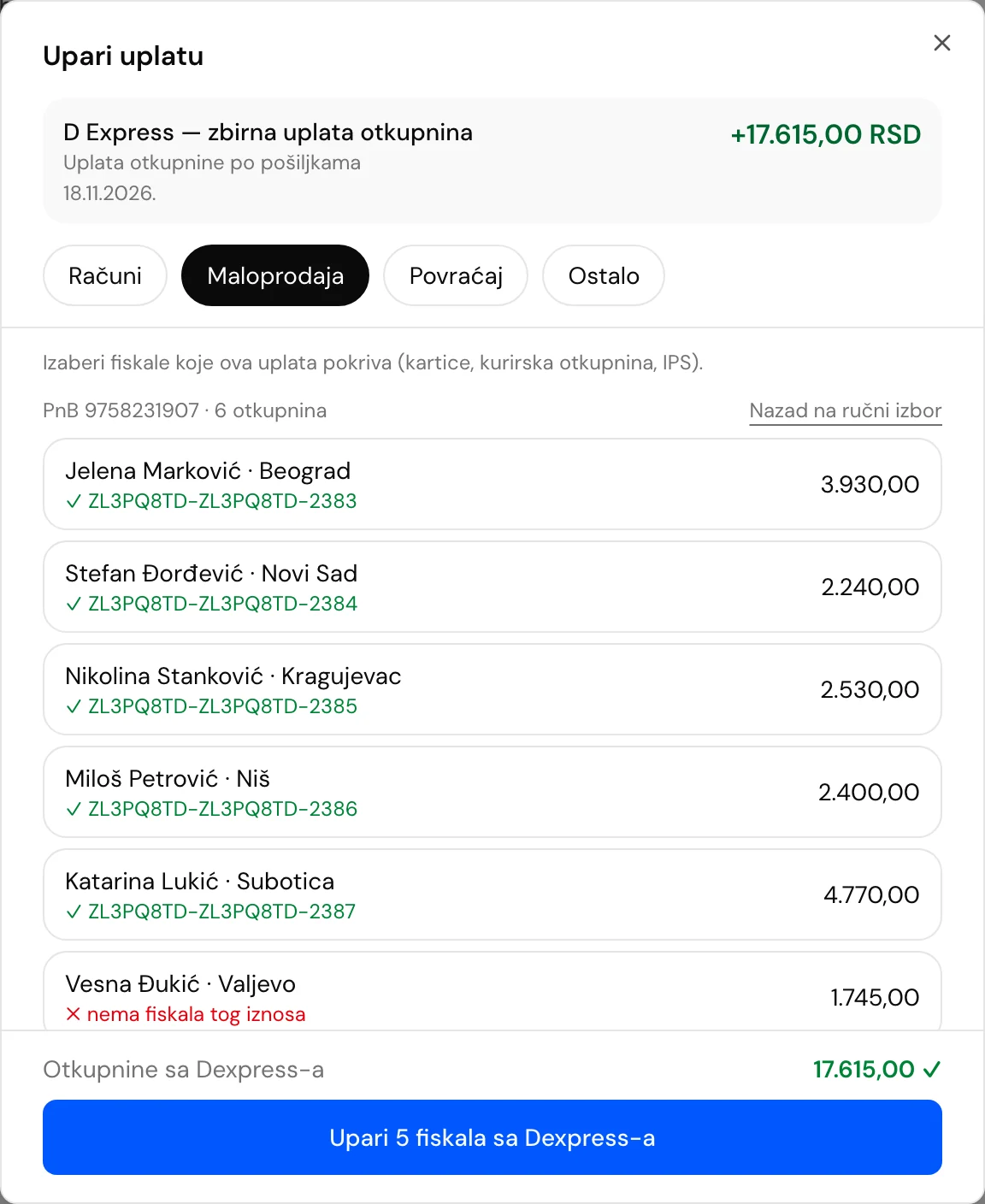
Each COD amount to its own fiscal receipt
A COD amount is the full total of one fiscal receipt (cash on delivery with no deductions), so matching is by exact amount.
Exact amount
Each COD amount gets a fiscal receipt of the same amount that is not yet linked. When several receipts have the same amount, the oldest goes first, and each receipt is used at most once.
Receipts from Retail
Real sales receipts in the statement’s currency are offered: issued in Solve Kasa or imported as PDF from another ESIR. For a final receipt after an advance, the remaining amount to be collected is matched.
COD amounts without a receipt show up
A COD amount with no fiscal receipt of the same amount is marked in red, with a count of such amounts. Enter the receipt in Retail and run it again.
Linking in one click
“Link N matched receipts” ties all matched receipts to the payment. They disappear from the “Receipts without a statement” list on the home screen and show as “On statement” in Income.
A group proposal for other payments
For a card, IPS or other courier payment, “Suggest a group” looks for fiscal receipts up to the payment date whose total is exactly the payment amount, oldest first. You can also pick by day, with a search by PFR number.
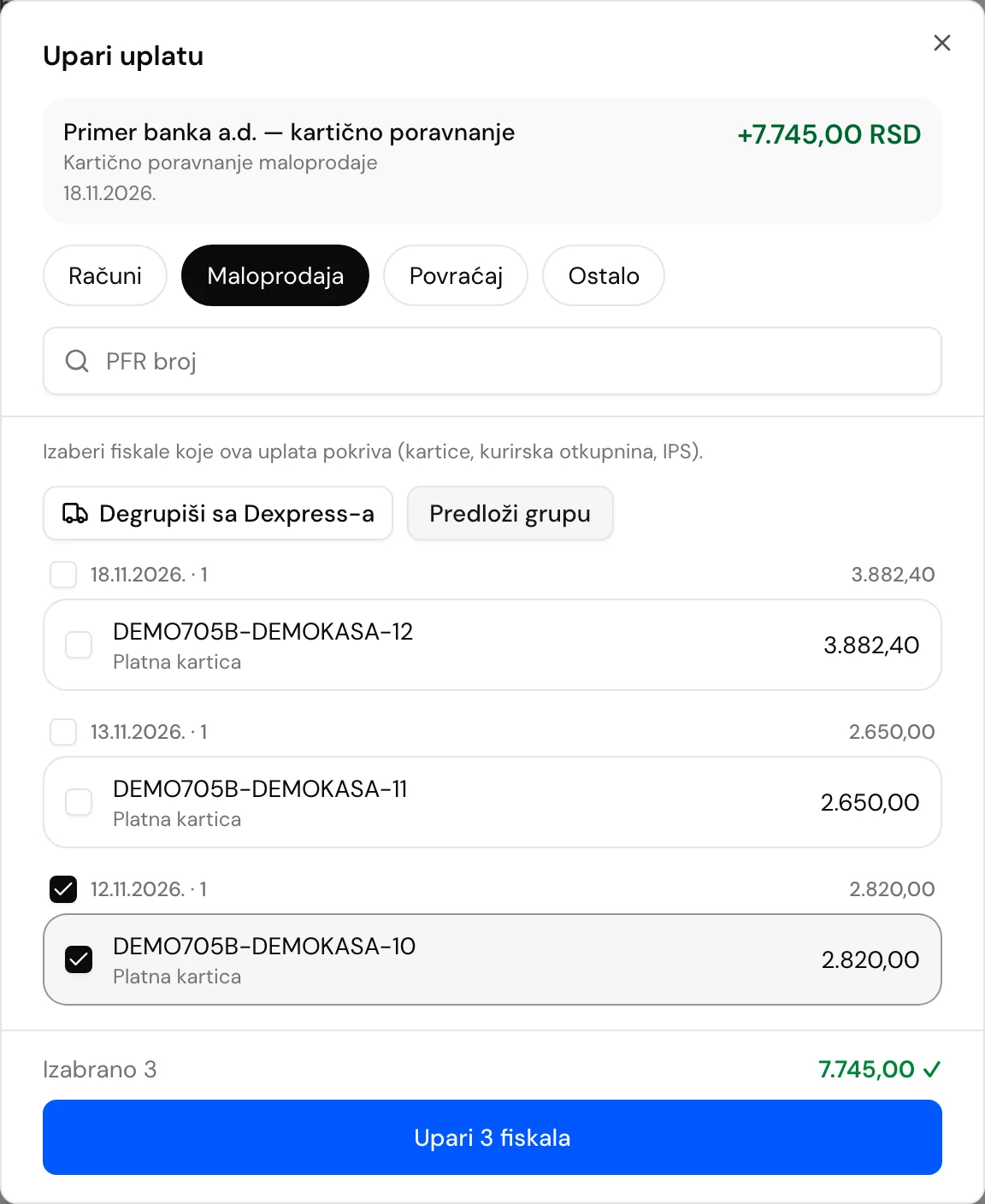
COD matching, step by step

Import the statement
The D Express bulk payment waits in Bank, on the “To match” list.
Open the payment
Click “Collect”, then the “Retail” tab and the “Split from D Express” button.
Check the list
For each COD amount you see the recipient, town, amount and fiscal receipt, with the total compared to the payment.
Link the matched receipts
One click ties all matched fiscal receipts to the payment.
Good to know before you start
- COD matching is a helper module and is free with the paid plans: a small integration alongside Bank, at no extra charge.
- The statement payment needs a payment reference number, and your company’s bank account must be entered in “My companies”. The list of COD amounts is requested with them.
- A fiscal receipt is already a completed sale, so linking only reconciles it with the statement.
- The list by parcel comes from the D Express portal. For other payments, use “Suggest a group”.
Works on desktop, tablet and phone – also as an app
On Android phones and tablets, get the app from Google Play (available in Serbia for now). An iPhone app is on the way; until then, open invoice.solve.rs in Safari and add it to your home screen. For Mac and Windows there is also a desktop app, with which invoices, pro formas and quotes work without internet (fiscal receipts still need internet). The interface is in Serbian; invoice PDFs can also be in English.
Get it on Google Play- Desktop
- Tablet
- Phone
- Each company’s data kept separate
- Interface in Serbian
- Cyrillic or Latin script
COD matching: frequently asked questions
What is COD matching?
D Express pays several cash-on-delivery amounts in one transfer with one payment reference number. Matching splits that payment into COD amounts by parcel and matches each to a fiscal receipt of the same amount.
How does the app know which COD amounts make up the payment?
From the grouped payment on the D Express portal. It is requested by your company’s bank account number and the payment reference number, and it returns the recipient, town and amount of each COD.
What are the COD amounts matched to?
To fiscal receipts from Retail, by exact amount. Each fiscal receipt is used at most once, and when several receipts have the same amount, the oldest goes first.
What if the COD total does not match the payment?
The app shows both the COD total and the payment amount. If they differ, you see it before linking, and you decide whether to link the matched receipts.
Can I do the same for another courier or card payments?
Yes. “Suggest a group” looks for fiscal receipts whose total is exactly the payment amount, and you can also pick them by hand. The list by parcel exists today for D Express, and we are building it for other courier services as needed.
What happens to my receipts when I link them?
Fiscal receipts stay as they are, and the link to the payment only reconciles them with the statement. A receipt leaves the “Receipts without a statement” list and shows as “On statement” in Income.
Sort COD payments without searching by hand
A demo account lasts 10 days, and we set it up together with you. See what splitting a payment looks like.
The demo account lasts 10 days. Most modules need us to set them up, so we open and set up the account together with you.
Related modules and solutions
- BankStatements, payment matching, cash bookLearn more
- Fiscal registerBrowser fiscal register, web shopLearn more
- InvoicingIssued and received invoices, e-invoices, partnersLearn more
- For businessesInvoicing, SEF, bank, expenses, inventory and payroll for LLCs and sole proprietors who keep full books.Learn more