

A fiscal register on Android: a phone or tablet as the till
Solve Kasa runs in the app for Android phones and tablets, which you get from Google Play. It issues receipts through the Serbian Tax Administration’s V-PFR, reads items with the phone camera, and a tablet paired with a QR code works only as the register.
- Online-only sales
- An extra till next to an L-PFR device
- A tablet at the counter or for waiters
- Cashiers with PINs
The demo account lasts 10 days and we set it up together with you. Plan prices are on the Pricing page, and no VAT is added to them.
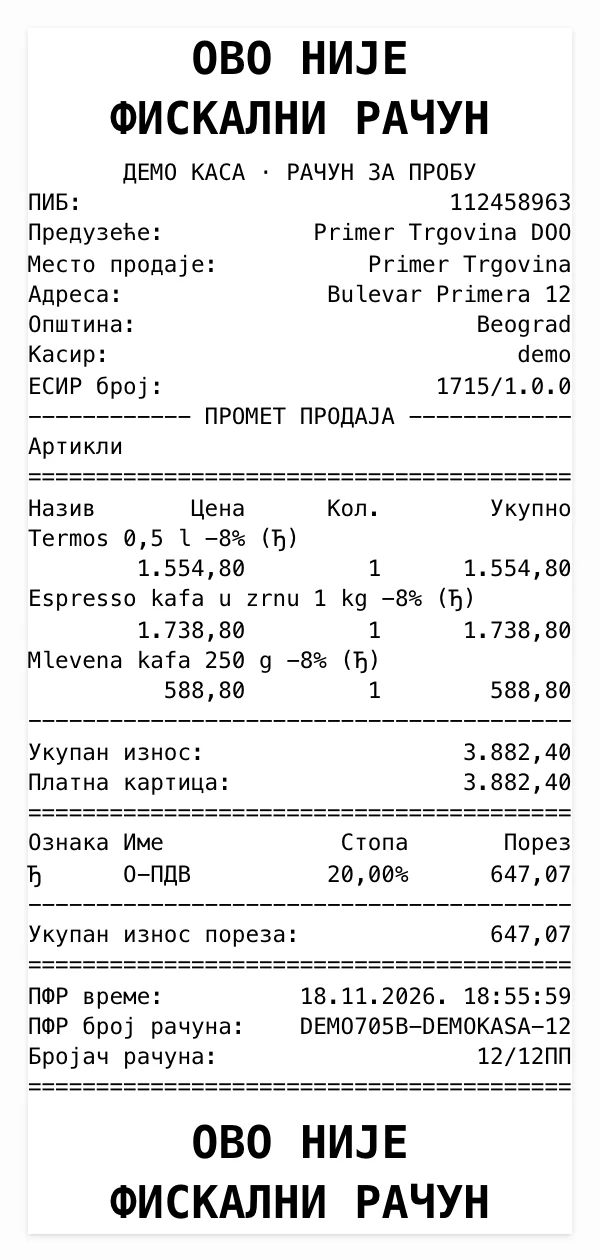
The Tax Administration approved Solve Kasa on 17 Nov 2026 (ESIR 1715). To issue real fiscal receipts, your company gets its own security element with a PAK from the Tax Administration, and we help with the request. Until then you try the register in demo mode, where receipts carry the notice “ОВО НИЈЕ ФИСКАЛНИ РАЧУН” (this is not a fiscal receipt).
At a glance
- app for Android phones and tablets
- Google Play
- receipts via the Tax Administration, no register hardware
- V-PFR
- barcodes read with the Google scanner
- Camera
- a paired tablet sees only the register
- QR
The register in the Google Play app
The app opens the same program as on a computer, so receipts, items and stock are the same on every device.
Get it on Google Play
Get the app for Android phones and tablets from Google Play, for now only in Serbia. You sign in with the same account as on a computer.
Updates arrive on their own
Register changes arrive without a new store version: the app opens the program from the server, so it is always up to date.
The screen stays on
In register mode the screen does not turn off while you work; on the owner’s phone it behaves as usual.
Everyone sees their part
Owners and managers see the whole program, the accountant gets an overview, and a register device sees only the register.
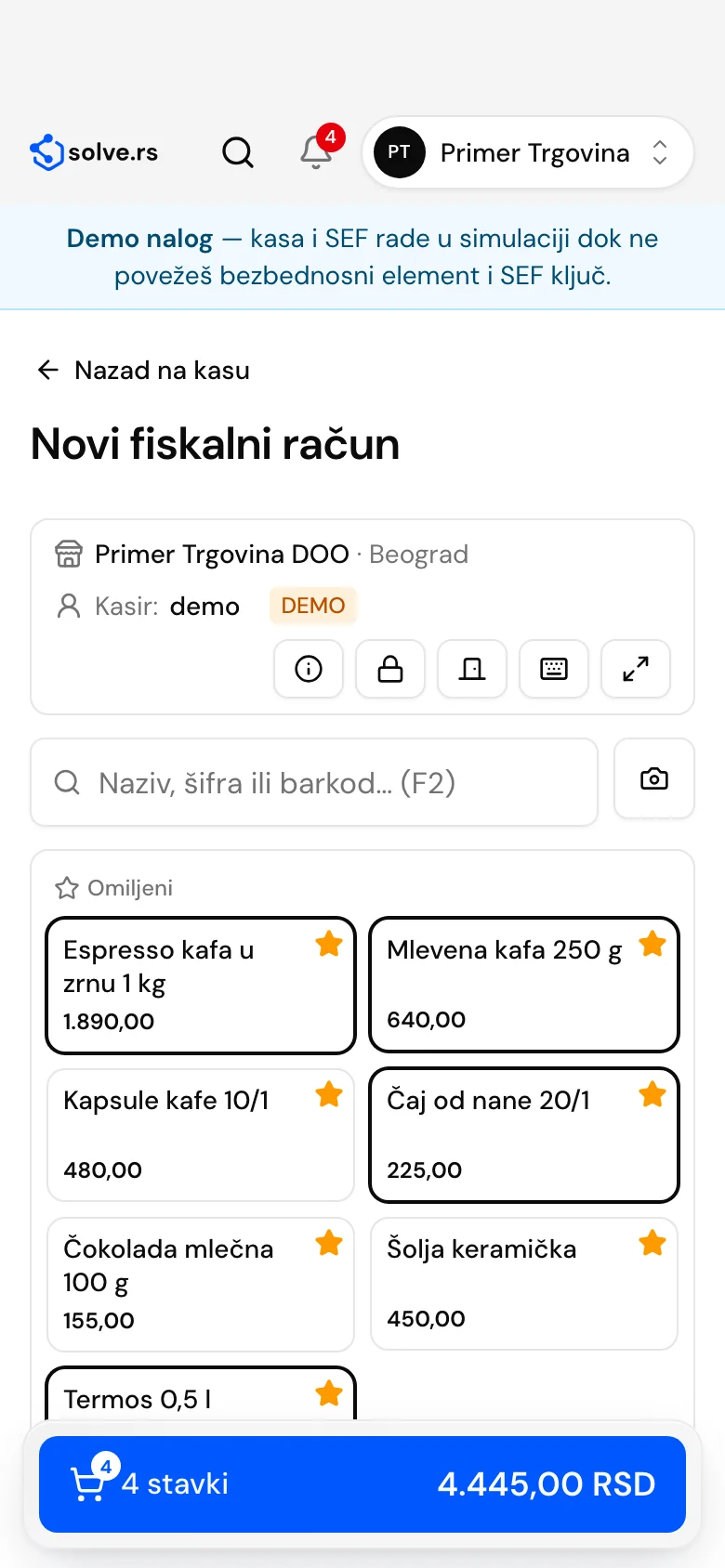
Ringing up receipts on a phone
Large buttons, search and favourite items as tiles, with the cart and payment on the same screen.
Barcodes with the camera
Read items with the Google scanner, which needs no camera permission. In continuous mode the scanner reopens by itself for the next item.
Or a barcode reader
A reader that works as a keyboard, over USB or Bluetooth, also works on a tablet.
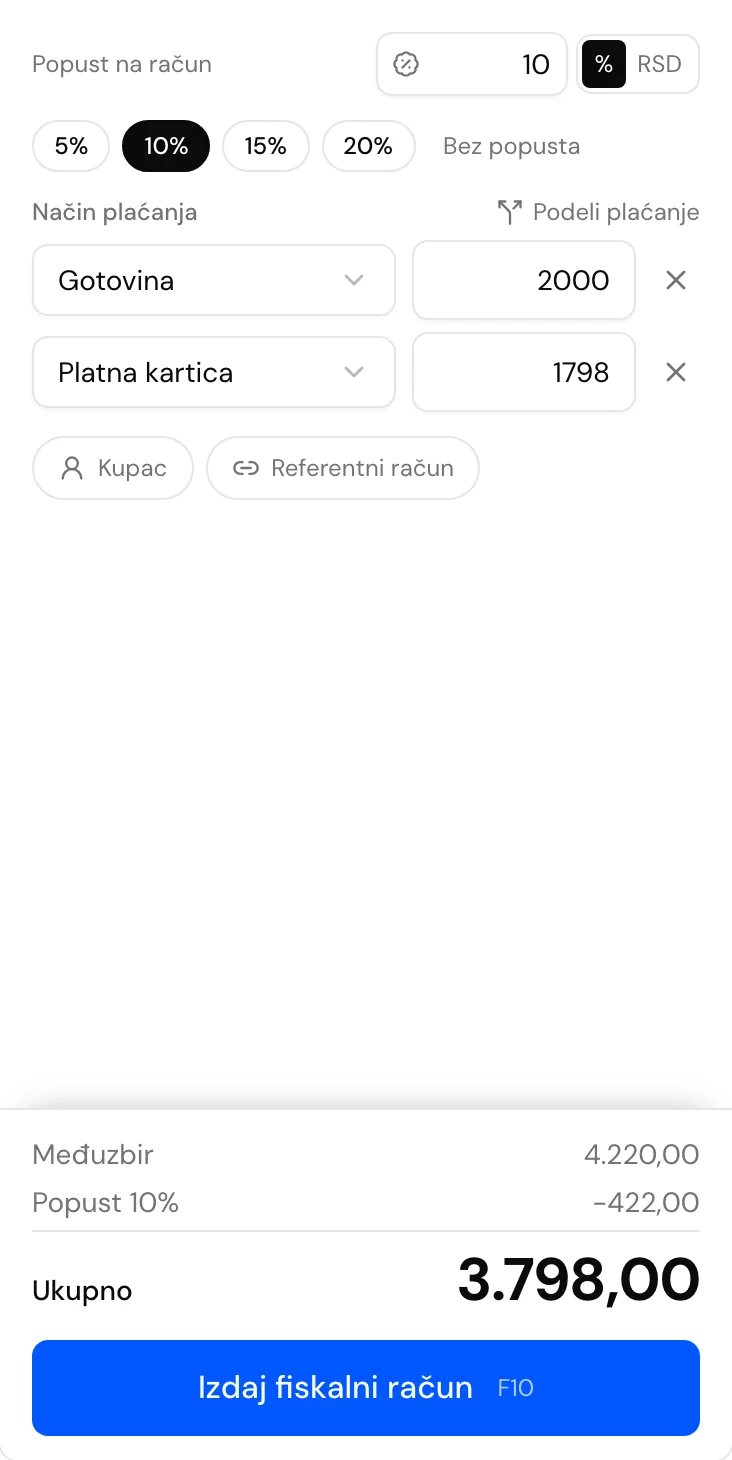
Several payment methods
Cash, card and other methods, several on one receipt, with change calculated.
Parked receipts and discounts
Park a receipt for later, and give a discount as a percentage on the whole receipt or per item.
Print, email or a verification link
Printing through Android
Print the receipt with its QR code through Android’s system printing, on 58 mm, 80 mm or A4, to a printer the phone can see.
Share or save
PDFs and other files open in the “Share” menu, so you send them in a message or keep them on the phone. A receipt can also be saved as an image.
Email or a verification link
The customer can get the receipt by email or a link to check it on the Tax Administration website.
Every receipt type
Sale, advance, pro forma, training and copy, each as a sale and as a refund.
A tablet as the till, cashiers with PINs
Pairing with a QR code
On the sign-in screen choose “Upari uređaj” (pair device) and scan the QR code: the tablet works as a register device and sees only the register.
Cashiers and PINs
Every cashier has their own account, and the register locks with the worker’s PIN, manually or by itself.
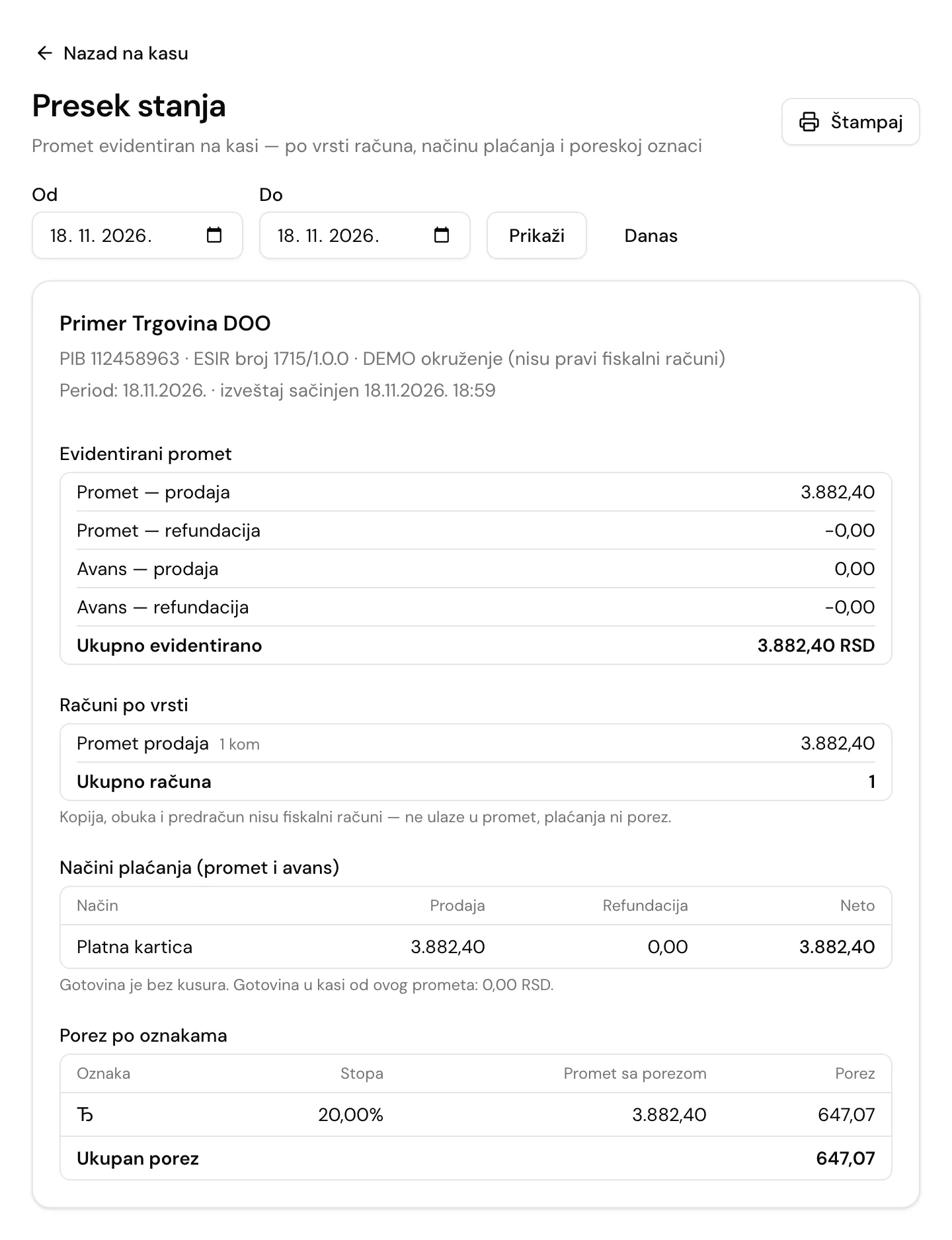
End-of-day summary
“Zatvori kasu” (close the register) makes the day’s summary with counted cash, and you can make a summary for any period.
Fiscal register on Android, step by step
Request a demo account
The demo account lasts 10 days, and we set it up together with you.
Install the app
On Google Play install the “Invoice Solvers” app (Solvers HUB) on the phone or tablet.
Sign in or pair
The owner signs in with their account, and a tablet for the till is paired with a QR code.
Security element
Your company gets a security element with a PAK from the Tax Administration, and we help with the request and the setup.
First fiscal receipt
The register issues receipts through V-PFR, on a phone, tablet or computer.
Good to know before you start
- The law requires every business premises, fixed or mobile (field, vehicle, fair), to have at least one device with a local processor (L-PFR) that works without internet. The only exception is selling exclusively over the internet. Solve Kasa works through V-PFR, so in a store, café or in the field it is an extra till next to that device, and for online-only sales it is enough on its own. An L-PFR for Solve Kasa is coming soon.
- The register issues receipts over an internet connection, and mobile data is enough. When the connection drops, the app carries on by itself as soon as it is back.
- On an iPhone, open invoice.solve.rs in Safari and add it to the home screen. An iPhone app is on the way.
Works on desktop, tablet and phone – also as an app
On Android phones and tablets, get the app from Google Play (available in Serbia for now). An iPhone app is on the way; until then, open invoice.solve.rs in Safari and add it to your home screen. For Mac and Windows there is also a desktop app, with which invoices, pro formas and quotes work without internet (fiscal receipts still need internet). The interface is in Serbian; invoice PDFs can also be in English.
Get it on Google Play- Desktop
- Tablet
- Phone
- Each company’s data kept separate
- Interface in Serbian
- Cyrillic or Latin script
Fiscal register on Android: frequently asked questions
Can I use an Android phone as a fiscal register?
Yes, as a register that issues receipts through the Tax Administration’s V-PFR; Solve Kasa is approved as an ESIR (identification number 1715). For online-only sales that is enough. In a store, café or in the field the law also requires at least one device with a local processor (L-PFR), and the phone and tablet with Solve Kasa are then extra tills. An L-PFR for Solve Kasa is coming soon.
Where do I get the app?
On Google Play, as “Invoice Solvers” (play.google.com/store/apps/details?id=rs.solve.app), for now only in Serbia. On an iPhone, open invoice.solve.rs in Safari and add it to the home screen.
Do I need a dedicated fiscal device?
Not for online-only sales: receipts are signed by the Tax Administration’s V-PFR with your company’s security element. Every other business premises, mobile ones included, needs at least one device with a local processor (L-PFR) next to the register on the phone or tablet. An L-PFR for Solve Kasa is coming soon.
How do I print a receipt from the phone?
Through Android’s system printing, on 58 mm, 80 mm or A4, to a printer the phone can see. You can also send the receipt by email, as a verification link or as an image.
What if the internet goes down?
The register issues receipts through V-PFR over an internet connection, and mobile data is enough. When the connection drops, the app waits and carries on by itself once it is back.
Does the register connect to a card terminal?
You mark a card payment on the receipt, alone or together with cash, and the bank’s terminal works as before.
How is it different from the Tax Administration’s free ESIR app?
The Tax Administration has a free ESIR app for Android. Solve Kasa is also linked to inventory, the KPO book, the bank and web shops, has cashiers with PINs and an end-of-day summary, and runs on a computer as well.
How much does it cost?
The fiscal register with inventory is an add-on of 250 RSD a month to the Sole Trader, Entrepreneur and LLC plans, and the stand-alone Cash Register plan is 990 RSD a month. We are not registered for VAT, so no VAT is added to the prices. The register is approved by the Tax Administration, and real fiscal receipts need your security element with its PAK.
Try the register on your phone
Request a 10-day demo account, install the app and ring up test receipts. Once your company has its security element with a PAK, the register issues real fiscal receipts.
The demo account lasts 10 days. Most modules need us to set them up, so we open and set up the account together with you.
Related modules and solutions
- Fiscal registerBrowser fiscal register, web shopLearn more
- HospitalityFloor plan, waiters, kitchen and bar, QR menuLearn more
- InventoryItems and services, KEP, recipes, stocktakingLearn more
- WooCommerce fiscalisationA wordpress.org plugin: a fiscal receipt for every order, with the verification link on the order and in the customer email.Learn more